NVMe vs SATA SSD: Does It Matter for Gaming?
Same frame rate, shorter loading screens. What the tests show, what PS5, Xbox and Steam Deck accept, and why NVMe now costs about the same as SATA.
Updated 28 October 2026. Checked against Microsoft's DirectStorage documentation, Sony's PS5 M.2 SSD guide, Samsung's spec sheets, published Forspoken load-time tests, and SSD prices on amazon.com trackers and amazon.in the same day.
Short answer: for actually playing games, no. A SATA SSD and an NVMe SSD give you the same frame rate. The difference shows up in loading. In the best-known test, Forspoken loaded a scene in 1.9 seconds from an NVMe drive and 3.7 seconds from a SATA SSD, while a hard drive took 21.5 seconds. So the big jump is hard drive to any SSD. NVMe over SATA is a smaller step that you'll notice, but it won't change how a game plays.
That said, I'd still buy NVMe in 2026 if your PC has a free M.2 slot, and the reason is mostly money. NVMe drives now cost about the same as SATA drives, and in India they're often cheaper. And if you're adding storage to a PS5 or Steam Deck, SATA simply isn't an option.
Jump to:
- SATA vs NVMe: what's the difference?
- Side by side
- What the load-time tests show
- Does DirectStorage change things?
- What games actually require
- PS5, Xbox and Steam Deck
- Prices in 2026 (USD and INR)
- Which one should you buy?
- How to check what your PC supports
- FAQ
SATA vs NVMe: what's the actual difference?
Both are SSDs. Both use flash memory, and both are miles ahead of a spinning hard drive. What's different is the road the data travels on to reach the rest of your PC.
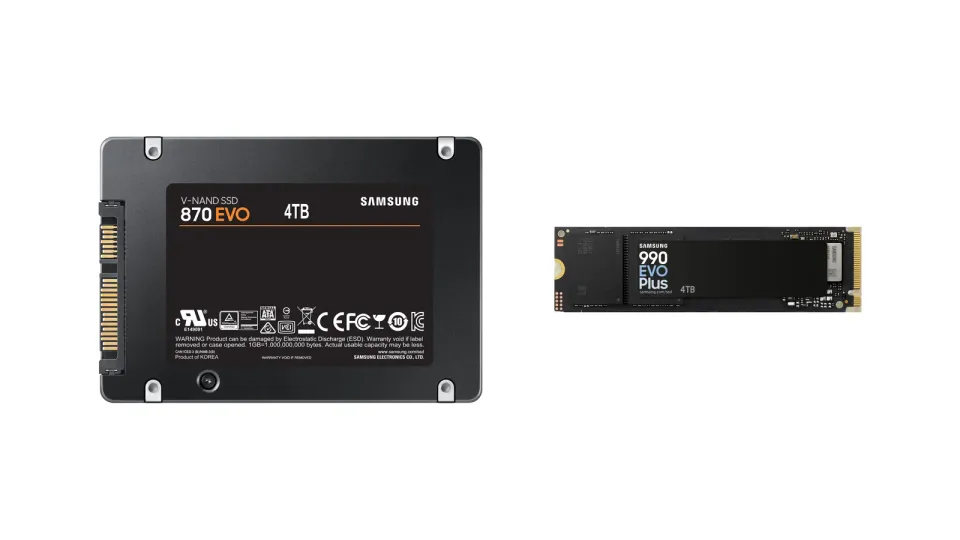
SATA is the same connection hard drives have used for years. It tops out at 6 Gb/s, which works out to roughly 550 to 560 MB/s in real reads. That's why almost every SATA SSD on the market lists the same number. Samsung's 870 EVO, one of the most popular SATA drives ever, is rated at 560 MB/s read and 530 MB/s write, and Samsung itself describes that as the maximum SATA allows. The drive isn't the limit. The cable is.
NVMe drives skip SATA and talk to the processor over PCIe lanes, the same kind of connection your graphics card uses. A PCIe 4.0 drive like Samsung's 990 EVO Plus is rated at up to 7,250 MB/s read. That's about 13 times the SATA ceiling on paper.
One thing trips a lot of people up: M.2 is a shape, not a speed. Most NVMe drives are M.2 sticks, but M.2 SATA drives exist too. They look almost identical and run at SATA speed. If a listing says "M.2" without "NVMe" or "PCIe", read the spec sheet before you buy.
Side by side
| Type | Connection | Typical top read speed | Shape | Works in |
|---|---|---|---|---|
| 2.5" SATA SSD | SATA III (6 Gb/s) | ~550 to 560 MB/s | 2.5-inch box, needs data and power cables | Almost any desktop, older laptops |
| M.2 SATA SSD | SATA III over an M.2 slot | ~550 to 560 MB/s | M.2 stick | Only M.2 slots that support SATA |
| NVMe PCIe 3.0 | PCIe 3.0 x4 | ~3,500 MB/s | M.2 stick | Most PCs from the last several years |
| NVMe PCIe 4.0 | PCIe 4.0 x4 | ~5,000 to 7,450 MB/s | M.2 stick | Newer PCs, PS5 expansion slot |
| NVMe PCIe 5.0 | PCIe 5.0 x4 | ~10,000 to 14,000+ MB/s | M.2 stick, often with a big heatsink | Recent high-end boards only |
A PCIe 4.0 drive still works in a PCIe 3.0 slot. It just runs at 3.0 speed. The same goes for 5.0 drives in 4.0 slots.
What the load-time tests show
Raw speed numbers make NVMe look 10 times better. Games don't scale like that, because loading isn't only reading files. The CPU has to unpack and set up everything it reads, and that part doesn't care which drive you have.
The cleanest public comparison is still Forspoken. At GDC 2022, developer Luminous Productions showed the same scenes loading from three drives, and Tom's Hardware wrote up the numbers:
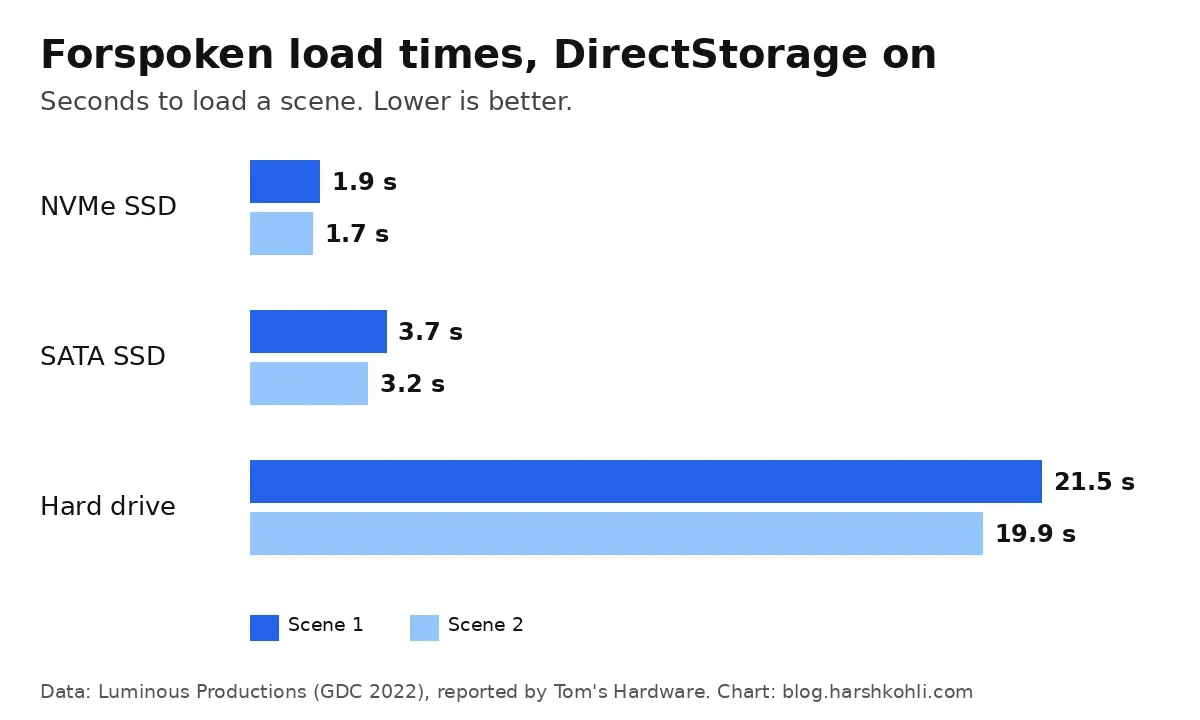
Look at the scale there. NVMe beats SATA by under two seconds. SATA beats the hard drive by about 17 seconds. If you're still gaming off a hard drive, any SSD is the upgrade that matters.
Later tests on the finished game found the same pattern. PCWorld's DirectStorage test put an MSI Spatium M480 NVMe drive against a Samsung 860 EVO SATA drive. In one scene the SATA drive took 7.4 seconds against 1.9 seconds for NVMe. That's a real gap, and you'd feel it on every fast travel. But it's a gap in waiting time, not in how the game runs once you're in.
Where you can sometimes feel the difference outside loading screens is in big open-world games that stream data while you move. On a hard drive that shows up as pop-in and stutter. On a decent SATA SSD it's rarely a problem today, though that could change as more games are built around console-speed storage.
Does DirectStorage change things?
DirectStorage is Microsoft's API for PC games that lets them pull data off fast SSDs more efficiently, and version 1.1 added decompression on the graphics card so the CPU does less work. Microsoft's own launch post says it works on Windows 10 and 11, recommends Windows 11, and says "installing games to an NVMe SSD will maximize your IO performance".
A few things worth knowing before you buy a drive for it:
- It isn't SATA-only or NVMe-only. DirectStorage runs on SATA SSDs too. You just get more out of it on NVMe.
- The game has to use it. Most PC games still don't, so for most of your library DirectStorage changes nothing.
- The gain was small in practice. In the Forspoken demo, switching DirectStorage on cut the NVMe load from 2.1 to 1.9 seconds. The drive type mattered more than the API.
If you're curious whether your drives qualify, Windows 11 can tell you. Press Win + G to open Game Bar, open Settings, then Gaming features. It lists your drives and whether each one is DirectStorage-ready.
What games actually require
Some games now list an SSD as a minimum requirement, and this is where the confusion starts. Check the store pages and you'll see the wording is just "SSD". Starfield's Steam page lists "SSD Required" with 125 GB of space, and Cyberpunk 2077's says "SSD required" too.
A SATA SSD meets both. I haven't seen a mainstream PC game that requires NVMe specifically. What these games are really saying is "don't run this from a hard drive", which matches the test results above.
Sizes are getting bigger too. Crimson Desert now lists 180 GB for the base game on Steam, plus 50 GB for its Charting the Unknown DLC, and it says an SSD is required. If that update broke your install, see our Crimson Desert DLC crash fixes.
PS5, Xbox and Steam Deck
On consoles and handhelds, the choice is mostly made for you.
PS5: Sony's M.2 SSD guide asks for a PCIe Gen4 x4 M.2 NVMe drive. M.2 SATA drives aren't supported. Capacity can be 250 GB to 8 TB, a read speed of 5,500 MB/s or faster is recommended, and the drive needs a cooling structure such as a heatsink. With the heatsink on, it must fit within 25 mm wide and 11.25 mm thick. If you're short on space for a huge game, my guide to freeing up space for GTA 6 on PS5 and Xbox covers the other options first.
Xbox Series X|S: there's no M.2 slot you can use. Extra fast storage goes in the Storage Expansion Card slot on the back, using an official card. A regular USB drive works for storage, but Seagate's support page spells out the catch: games optimised for Series X|S can't be played from USB, only from internal storage or the expansion card. Xbox One games can still play from a USB 3.0 drive.
Steam Deck: Valve ships it with an NVMe SSD in the short M.2 2230 size. There's no SATA option. If you're upgrading, back up first and expect to reinstall SteamOS. If something goes wrong after an update instead, here's how to fix a Steam Deck black screen after an update.
Prices in 2026 (USD and INR)
A few years ago, SATA was the budget option. That gap has nearly closed, and SSDs overall have gotten pricier this year because of a NAND flash shortage. Market tracker TrendForce expects contract prices to rise again in the last quarter of 2026, so treat every number below as a snapshot.
In the US: ratioDB's amazon.com index on 28 October 2026 put M.2 NVMe at about $133.85 per TB and 2.5" SATA at about $122.93 per TB, so NVMe costs roughly 9% more. M.2 SATA was the worst value at about $242 per TB. CheapestSSD showed a similar picture the same day: the cheapest SATA drive worked out to about $110 per TB, and the cheapest new NVMe drive to about $132 per TB.
In India: NVMe often wins outright. These are 1 TB prices I saw on amazon.in on the evening of 28 October 2026. They change daily, so use them as a rough guide:
| Drive (1 TB) | Type | Price on amazon.in (approx.) |
|---|---|---|
| Crucial BX500 | 2.5" SATA | ₹16,999 |
| WD Blue SA510 | 2.5" SATA | ₹19,999 |
| Samsung 870 EVO | 2.5" SATA | ₹31,000 |
| Crucial E100 | NVMe PCIe 4.0 | ₹15,995 |
| Kingston NV3 | NVMe PCIe 4.0 | ₹17,999 |
| WD Blue SN5100 | NVMe PCIe 4.0 | ₹18,900 |
| Crucial P3 Plus | NVMe PCIe 4.0 | ₹18,999 |
| Samsung 990 PRO | NVMe PCIe 4.0 | ₹29,299 |
The cheapest drive on that list is an NVMe drive, and the well-known Samsung SATA drive costs more than the Samsung 990 PRO. When a PCIe 4.0 drive costs the same as SATA, there isn't much reason left to pick the slower one unless your PC has no M.2 slot.
One honest caveat: the cheapest NVMe drives tend to be DRAM-less and slow down once you copy a lot of data in one go. For installing and playing games that rarely matters. For moving huge video projects around, a better drive is worth the extra money.
Which one should you buy?
- You're still on a hard drive: get any SSD. This is the upgrade you'll feel most. Pick NVMe if you have a free M.2 slot, SATA if you don't.
- Your PC has a free M.2 NVMe slot: buy a PCIe 4.0 NVMe drive. It costs about the same as SATA now and it's ready for games that use DirectStorage.
- Your PC only has SATA ports (common on older desktops and some budget laptops): a 2.5" SATA SSD is still a great upgrade. Games will load a couple of seconds slower than on NVMe and play the same.
- You already have a SATA SSD: I wouldn't replace it for gaming alone. Add an NVMe drive when you need more space, and keep the SATA one for older games.
- PS5 or Steam Deck: NVMe only. Follow Sony's and Valve's size rules.
- Xbox Series X|S: an official Storage Expansion Card for current-gen games, or a cheap USB drive to store games you're not playing right now.
And if you're looking at PCIe 5.0 drives for gaming, skip them unless you're building a high-end PC anyway. Today's games don't load meaningfully faster from them, and they run hot.
How to check what your PC supports
- See what you have now. Open Task Manager, go to Performance and click each disk. It shows the type as SSD or HDD. For the exact model, open Settings > System > Storage > Advanced storage settings > Disks & volumes and search the model name.
- Find your motherboard or laptop model. Press Win + R, type
msinfo32, and look at "BaseBoard Product" on desktops or "System Model" on laptops. - Check the manual or spec page. Look for M.2 slots and whether they support "PCIe" or "NVMe", "SATA", or both, plus the supported length (2280 is the standard desktop size).
- Read the fine print on shared lanes. On some motherboards, using a certain M.2 slot switches off one or two SATA ports. The manual will say so.
If you're upgrading because Windows feels slow and Task Manager keeps showing the disk at 100%, my Windows 11 100% disk usage fix walks through what to try first. On a hard drive, though, an SSD is usually the real fix.
Shopping for a gaming handheld rather than a drive? Storage size and SSD format differ a lot between models. My Steam Deck vs ROG Xbox Ally X vs Legion Go S comparison covers which one takes a standard 2280 SSD.
Related guides: next stop is my guide to fixing high ping and lag in online games. After that, see a controller your PC won't detect and Enshrouded crashes and missing saves if either matches what you're seeing. Clearing console space instead? My GTA 6 file size guide has the confirmed 212 GB figure. Upgrading memory at the same time? Read whether you should wait for RAM prices to drop before you buy.
FAQ
Does NVMe increase FPS in games?
No. Frame rate depends on your GPU and CPU. Once a game has loaded, SATA and NVMe SSDs give the same FPS. NVMe mainly cuts loading time, and in tested games the gap is a few seconds at most.
Is a SATA SSD good enough for gaming in 2026?
Yes. Games that list "SSD required", like Starfield and Cyberpunk 2077, are fine on SATA. You'll wait a bit longer on loading screens than with NVMe, and that's about it.
Can I use a SATA SSD in a PS5?
No. Sony only supports PCIe Gen4 x4 M.2 NVMe drives in the PS5's expansion slot, and says M.2 SATA drives won't work. You can use a USB drive to store PS5 games, but not to play them.
Is PCIe 4.0 worth it over PCIe 3.0 for gaming?
For load times alone, the difference is small. But PCIe 4.0 is what most mainstream drives use now, it's required for the PS5, and a 4.0 drive works fine in a 3.0 slot, so there's little reason to hunt for an older 3.0 model.
Should I install games on my SSD or hard drive?
The SSD, especially newer open-world games. Keep the hard drive for older games, recordings, and backups. The Forspoken test shows why: about 2 to 4 seconds on an SSD against roughly 20 seconds on a hard drive.
How do I know if my SSD is NVMe or SATA?
Search the model name shown in Windows Settings (Disks & volumes) or Device Manager. Model names often give it away too. For example, Samsung's 870 is SATA and the 990 series is NVMe.
Still not sure?
Leave a comment with your PC, laptop or console model and what you play. I'll tell you which kind of drive it takes and whether an upgrade is worth it.

Comments ()