Enshrouded Crashing or Saves Missing? 1.0 Fixes
Enshrouded crashing, or your Early Access character missing after 1.0? Patch 1.0.1.0 fixes more migration errors. Here's how to rerun it and stop the crashes.
Updated 2 November 2026. Checked against Keen Games' Patch 1.0.1.0 notes (posted this afternoon), the three 1.0 hotfix changelogs and the Steam store page today.
Short answer: update Enshrouded to Patch 1.0.1.0 (build 1283531), which Keen Games released on 2 November. If your Early Access character or world failed to migrate, launch the game again so the migration reruns. Keen's own note says "please try the migration again with this update". If a character is missing, look in both the Local and Steam Cloud tabs before you assume it's gone. For crashes, the patch fixes a random GPU crash and a crash on exit, and the earlier hotfixes dealt with water, factory and peripheral crashes.
Enshrouded left Early Access on 15 October and it's still busy. Steam showed just over 51,000 people playing when I checked this evening. That's a lot of old saves going through a brand-new format, and a lot of the crash threads come down to that. Below is what each update fixed, how to get a stuck save to migrate, and the PC checks worth doing if it still crashes.
Jump to:
- What's going on
- Which update fixed what (table)
- Step 1: Update to Patch 1.0.1.0
- Step 2: Check both the Local and Steam Cloud tabs
- Step 3: Back up your save folder, then rerun the migration
- Step 4: Make sure the save folder isn't read-only
- Step 5: Fix crashes on PC
- Step 6: Send Keen your save if nothing works
- FAQ
What's going on
Enshrouded 1.0 came out on PC and PS5 on 15 October 2026 for $39.99. On Steam in India it's ₹1,799. The Xbox Series X|S version is planned for spring 2027. The update brought the full map, a new endgame biome called Cinder's Cradle and a new save format. PC players who bought in Early Access didn't have to pay again, and Keen said old saves would carry over. On first launch, the game backs up saves from version 0.8 or earlier and converts them.
For most people that worked. For a noticeable number it didn't. Some characters never showed up, some worlds crashed halfway through converting, and some huge bases ran out of memory during the process. Keen has shipped three hotfixes and one patch in 18 days, and nearly every one has a line about migration. Hotfix 1.0.0.2 explains the missing characters well: a corrupted character would crash the migration, so Keen made the game skip those characters for now. Its advice was "if you are missing a character in your character list in the current version, please be patient - help is on the way!"
Hotfix 1.0.0.3 was that help, at least for one cause. Characters with broken entries in the extra backpack slots now migrate, minus the items that caused the problem. It also handles bases where the Flame Altar wasn't sitting in the voxel grid properly. The catch is that the water in an affected base can't be loaded and has to be added back by hand.
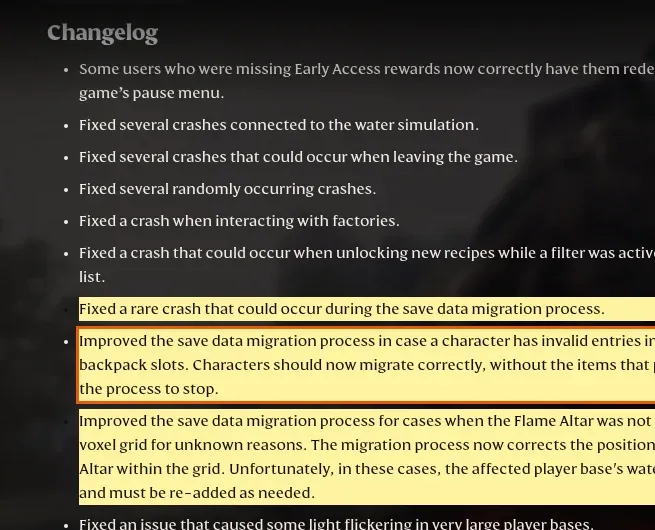
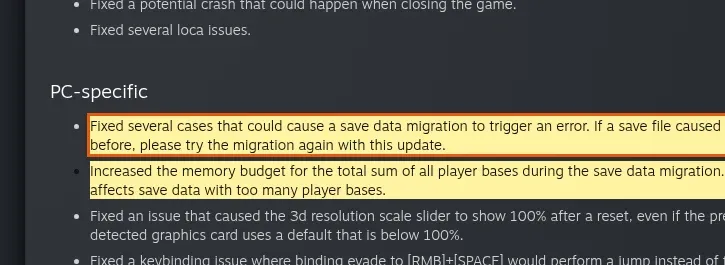
Patch 1.0.1.0 went up on Steam this afternoon. Most of it is combat and building tweaks, but the PC-specific section is what matters here. Keen fixed "several cases" that made migration throw an error, raised the memory budget for saves with lots of player bases, and fixed a random GPU crash.
I should be upfront: I haven't had a save fail to migrate myself, so I'm not claiming I've tested each step below on a broken save. All of it comes from Keen's changelogs and the advice Keen gives in them. Where I'm adding general PC troubleshooting of my own, I say so.
Which update fixed what
If you stopped playing after a crash on launch week, here's what changed since. Steam updates the game automatically, so you should already be on the newest version unless you set Enshrouded to update only when you launch it.
| Update | Date | Crash and save fixes |
|---|---|---|
| Hotfix 1.0.0.1 (build 1267041) | 15 Oct 2026 | Random crashes; crashes caused by certain peripherals plugged into the PC |
| Hotfix 1.0.0.2 (build 1269579) | 16 Oct 2026 | Corrupted characters skipped instead of crashing migration; grey fog on Nvidia cards; crashes when fast travelling or gliding in busy worlds, browsing shared adventures, exiting the game |
| Hotfix 1.0.0.3 (build 1273043) | 21 Oct 2026 | Water simulation and factory crashes; a rare migration crash; backpack-slot and Flame Altar migration failures; endless black screen when joining multiplayer; V-Sync stutter on AMD cards |
| Patch 1.0.1.0 (build 1283531) | 2 Nov 2026 | More migration errors; more memory for saves with many bases; random GPU crash; crash on closing; skills stopping after hours of play; ESC key breaking after the AMD overlay; multiplayer stability with very large bases |
Step 1: Update to Patch 1.0.1.0
Close the game fully and open Steam's Downloads page. If an Enshrouded update is listed there, let it finish. Restarting Steam itself usually nudges a stuck download along. If you set the game to update only when you launch it, launching it once will pull the patch.
If you host a dedicated server for friends, update the server too. A client on the new patch and a server on an older build is the kind of mismatch that produces odd join errors, and that's the first thing I'd rule out before blaming the save.
Step 2: Check both the Local and Steam Cloud tabs
This is the quick one, and it's worth doing before anything else. In 1.0 the character and world selection screens have separate Local and Steam Cloud tabs. A character that seems to have vanished is sometimes just sitting in the other tab. Click both before you start digging through folders.
Two other 1.0 changes that look like bugs but aren't: your skill tree is reset on the first 1.0 load so you can re-spend the points, and keybinds went back to the defaults. Neither means the migration broke.
Step 3: Back up your save folder, then rerun the migration
The game already makes a backup before it migrates, but I'd still make my own copy before running it again. It takes a minute and it means nothing you try afterwards can make things worse.
- Close Enshrouded.
- Press Win + R, paste
%USERPROFILE%\Saved Games\keen games\Enshroudedand press Enter. The full path Keen gives isC:\Users\YOURNAME\Saved Games\keen games\Enshrouded\default. - Copy the whole
Enshroudedfolder somewhere else, like your desktop or a USB drive. - Start the game on Patch 1.0.1.0 and load the character or world that failed before. Keen says saves that hit migration errors earlier should be tried again with this update.
Give it time. A large world with many bases can take a while to convert. Patch 1.0.1.0 specifically raised the memory limit for that case, so a world that crashed partway through last week has a better chance now.
Step 4: Make sure the save folder isn't read-only
The 1.0 changelog added a warning for saves the game can't write to. If you see it, or saves don't seem to stick, right-click the Enshrouded save folder, choose Properties and untick Read-only. Apply it to all subfolders and files.
This tip is mine rather than Keen's: if the folder sits inside OneDrive, or Windows Controlled Folder Access is turned on, either one can block a game from writing there. Pausing OneDrive sync while you play, or allowing enshrouded.exe through Controlled Folder Access in Windows Security, rules that out.
Step 5: Fix crashes on PC
If the save is fine but the game keeps crashing, go through these in order. They're quick:
- Verify the game files. Steam Library, right-click Enshrouded, Properties, Installed Files, Verify integrity of game files.
- Unplug extra USB devices. Hotfix 1.0.0.1 fixed crashes caused by "specific peripherals attached to the PC". If you're on an old build or still crashing on launch, unplug wheels, flight sticks, odd controllers and audio interfaces and try again.
- Update your graphics driver, then expect a shader compile. Keen says the 1.0 shader compile after a driver update is shorter than it was, but it can't be skipped. A long load right after a driver update is normal, not a freeze.
- AMD users: Patch 1.0.1.0 added new AMD graphics settings and fixed ESC stopping working after you open the AMD overlay. If Steam itself is crashing on your Radeon PC, that's a separate driver bug, and I've covered it in Steam crashing on launch with AMD Radeon.
- Check you meet the minimum spec. Steam lists 16 GB of RAM and a 6 GB graphics card (GTX 1060, RX 580 or Arc A380) as the minimum, plus 60 GB of space, with an SSD recommended. On 8 GB of RAM it's going to struggle no matter what you patch. If you're still on a hard drive, my NVMe vs SATA SSD guide explains what moving the game to an SSD actually changes.
- Odd audio after a crash? One launch-day bug workaround from Keen: keep the in-game master volume at 100% and turn the volume down in Windows instead.
Steam Deck owners are in better shape than you might expect. Enshrouded is now Steam Deck Verified, which Keen announced on 23 October. If your Deck goes to a black screen after a SteamOS update rather than in the game, that's a different problem, and this black screen fix covers it.
Step 6: Send Keen your save if nothing works
If a character still won't migrate on 1.0.1.0, report it through Keen's support site at enshrouded.zendesk.com. Keen has been fixing migration bugs one cause at a time, so a report with your save attached gives them something concrete to work with. After you file a ticket, watch your inbox, because Keen may reply asking for more details and your save files. Send the copy you made in Step 3, not a folder you've since played on.
While you wait, don't delete anything. Hotfix 1.0.0.2 skipped corrupted characters on purpose so Keen could repair them in a later update, and you want the original file around when that happens.
If you're working through other launch-week crashes this month, my Phantom Blade Zero crash fix and Crimson Desert DLC fix follow the same pattern: patch first, then the save, then the PC.
Related guides: start with my guide to fixing high ping and lag in online games for the wider gaming and PC hardware picture. I've also covered a controller your PC won't detect and Steam Deck vs ROG Xbox Ally X vs Legion Go S.
FAQ
Why is my Enshrouded character missing after 1.0?
Check both the Local and Steam Cloud tabs first. If it isn't in either, the character may have been skipped during migration. Hotfix 1.0.0.2 made the game skip corrupted characters instead of crashing. Update to Patch 1.0.1.0 and launch again so the migration can retry, and contact Keen's support if it's still missing.
Where are Enshrouded save files on PC?
Local saves are in C:\Users\YOURNAME\Saved Games\keen games\Enshrouded\default. You can get there quickly by typing %USERPROFILE%\Saved Games\keen games\Enshrouded into the Win + R box.
What does Enshrouded Patch 1.0.1.0 fix?
On PC, it fixes several save migration errors, gives more memory to saves with lots of player bases, fixes a random GPU crash, fixes a crash when closing the game, and fixes the ESC key breaking after using the AMD overlay. It also fixes skills stopping after hours of play and makes hosting worlds with very large bases more stable.
Why is the water gone from my base after migrating?
If your Flame Altar wasn't placed correctly in the voxel grid, Hotfix 1.0.0.3 moves it so the base can migrate, but Keen says the water in that base can't be loaded. You'll need to add it back yourself.
Can I play Enshrouded with friends on PS5 and PC together?
Not yet. Keen said at launch that cross-platform play wasn't in 1.0 and that it's working on it, without giving a date.
How much does Enshrouded cost?
The game costs $39.99 on Steam and PS5. On Steam in India it's ₹1,799. If you bought it on PC during Early Access, you already own 1.0.

Comments ()