GTA 6 Won't Start on PS5 or Xbox? Launch Error Fixes
GTA 6 won't start? Install PS5 update 14.23, then fix WS-116449-5, CE-100095-5 and Xbox 0x803F8001 with Sony and Microsoft's own steps.
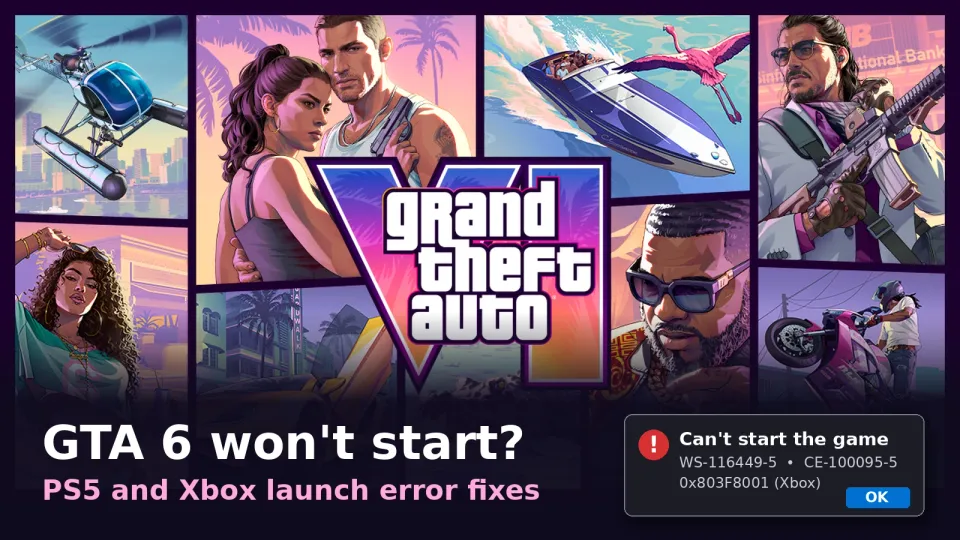
Updated: 19 November 2026 (launch day). Checked against PlayStation's Grand Theft Auto VI support page, Sony's error pages for WS-116449-5, CE-109258-5 and CE-100095-5, Sony's restore licenses guide, Xbox Support's 0x803F8001 and Home Xbox pages, and launch-night reporting from IGN, Axios and Notebookcheck.
Short answer: if GTA 6 won't start on a PS5, install system software 14.23 first. Sony says it's required before you can play, even if your preload finished days ago. After that, check the PlayStation or Xbox status page, restore your licences (PS5) or set your Home Xbox, and only delete and reinstall as a last resort, because that means pulling down up to 212 GB again.
If you're wondering about a future PC version, I also built a free Will My PC Run GTA 6? spec checker. Rockstar hasn't published official PC requirements, so it's clearly labelled as an estimate.
GTA 6 is a single-player game with no online mode at launch, so there isn't a "GTA 6 server" to go down. Almost every launch-night lockout I've seen reported comes from three things: the console's own update, the PlayStation Network or Xbox network checking your licence, or a download that didn't quite finish.
How I wrote this: I'm not going to pretend I've hit every one of these errors on my own consoles tonight. The steps below come from Sony's and Microsoft's own support pages, Rockstar's and PlayStation's launch notes, and what outlets and players reported in the first hours. Where something is only a player report, I say so.
Jump to:
- Why GTA 6 won't start
- Quick checker: match your error to the fix
- Step 1: Make sure it has unlocked for you
- Step 2: PS5: install system software 14.23
- Step 3: Check PSN and Xbox status
- Step 4: Fix WS-116449-5 and other PSN errors
- Step 5: PS5: restore licences and turn on offline play
- Step 6: Xbox: fix "Do you own this game?" (0x803F8001)
- Step 7: Finish the download and game updates
- Step 8: CE-100095-5 or crashes: rebuild, then reinstall
- FAQ
Why GTA 6 won't start
There are a few things going on at once this week. Sony pushed PS5 system software 26.07-14.23.00 on November 17. IGN puts it at 1.267 GB, and the patch notes only mention "some security fixes to the system software." A day later the PlayStation Support US account posted that the update "is required before playing Grand Theft Auto VI," and Rockstar reposted it. So a console still on 14.22 or older simply won't let you in.
Then the networks got hammered. On November 18, hours before the big Western unlocks, PlayStation's status page warned that players "might have difficulty launching games, apps or network features," according to Axios. Sony marked it resolved by about 2:30 p.m. ET. Xbox users saw far fewer problems, though some reports did show up on Downdetector.
Why would a single-player game care about PSN at all? Because the console checks that your digital copy is licensed when the game unlocks. Every copy is digital in practice, too. Sony's page says the boxed "Code-In-Box" edition only contains a download code, with no disc.
Quick checker: match your error to the fix
| What you see | Platform | What it usually means | Go to |
|---|---|---|---|
| Countdown, "not available yet" or locked tile | PS5 / Xbox | Your region hasn't hit midnight on Nov 19 yet | Step 1 |
| Asked to update, or the game just won't open | PS5 | Console isn't on system software 14.23 | Step 2 |
| "Sony services are busy" or "Too many failed connection attempts" | PS5 | PSN under heavy load (reported, no Sony page) | Steps 3 and 4 |
| WS-116449-5 | PS5 | Sony: "This service is currently under maintenance" | Step 4 |
| CE-109258-5 | PS5 | Sony: couldn't reach the server, licence not confirmed | Steps 4 and 5 |
| Padlock on the game tile | PS5 | Licence needs restoring | Step 5 |
| 0x803F8001 "Do you own this game or app?" | Xbox | Console can't confirm you own it | Step 6 |
| "Temporary network problem" | Xbox | Xbox network or licence check slow (player reports) | Steps 3 and 6 |
| Download stuck, or "update required" for the game | PS5 / Xbox | Patch or last part of the download missing | Step 7 |
| CE-100095-5, crashes, console shuts off | PS5 / Xbox | Bad install, or an unconfirmed launch bug | Step 8 |
Step 1: Make sure it has unlocked for you
PlayStation's support page says GTA 6 "releases at midnight local time on November 19, 2026," and Rockstar says the same for Xbox Series X|S. So New Zealand, Australia and most of Asia got in first, and Europe and the Americas follow as midnight reaches them. A finished preload doesn't get you in early.
If midnight has passed where you are and it's still locked:
- Close the game completely and start it again. Don't just resume it from rest mode.
- Check the console's date and time are set automatically from the internet, not by hand.
- Make sure the console is actually online when you launch it the first time.
Step 2: PS5: install system software 14.23
This is the one most PS5 owners will hit, and it's the easiest to fix. Preloading downloads the game, not the console's firmware, so even a fully preloaded copy needs this.
- Go to Settings > System > System Software > System Software Update and Settings.
- If it shows Update Available, choose Update System Software and let it finish. Don't turn the console off during the install.
- While you're on that screen, turn on Download Update Files Automatically and Install Update Files Automatically, which is what Sony's GTA VI page recommends anyway.
- Restart the PS5 and launch the game again.
If the system update itself won't download because PSN is struggling, wait a bit and try again. Sony hasn't published a workaround for that, and there's no reason to download firmware from anywhere other than the console or Sony's own site.
Step 3: Check PSN and Xbox status
Before you change a single setting, look at the official status pages. If something's red there, nothing you do at home will fix it.
- PS5: status.playstation.com
- Xbox: Xbox status (look at Account and profile, and Store and subscriptions)
- Rockstar: Rockstar service status, which covers Rockstar account sign-in but has no separate GTA VI row
The November 18 PSN problem lasted well under a day, so if you see an outage listed, the honest advice is to step away for half an hour. Hammering the sign-in button can make the "too many failed connection attempts" message worse.
Step 4: Fix WS-116449-5 and other PSN errors
Sony's own page for WS-116449-5 says the service may be under maintenance. If the status page is green, Sony asks you to try these, in this order:
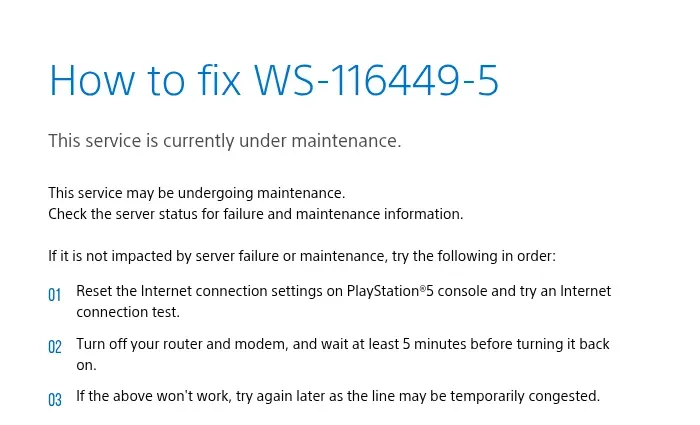
- Reset the internet connection settings on the PS5 and run an internet connection test (Settings > Network).
- Turn off your router and modem and wait at least 5 minutes before turning them back on.
- If that doesn't help, try again later, since the line may just be congested.
CE-109258-5 is a close cousin. Sony says it means the connection to the server failed and "the license information for the content wasn't confirmed." Its fix list is the status page, a console restart, the same 5-minute router reset, then Restore Licenses, which is the next step.
Step 5: PS5: restore licences and turn on offline play
If the game shows a padlock or says you can't play it on an account that definitely bought it, restore the licence. Sony says this won't touch your saved data.
- Go to Settings > Users and Accounts > Other > Restore Licenses.
- Select GTA VI (or everything) and choose Restore.
- Quicker option: highlight the game on the home screen or in your Game Library, press the Options button and pick Restore License.
Next, turn on Console Sharing and Offline Play while PSN is working. Sony's GTA VI page tells you to enable it so other accounts on the console can play, and it's also the setting that lets your main PS5 run your downloaded games without asking PSN first.
- Sign in with the account that bought the game.
- Go to Settings > Users and Accounts > Other > Console Sharing and Offline Play.
- Select Enable.
Make sure you're signed in with the same account that ordered GTA 6 or redeemed the code. Sony lists that as one of the first things to check when the download won't start, and it trips up a lot of shared family consoles. If your boxed code is missing or unreadable, Sony says to contact the retailer you bought it from.
Step 6: Xbox: fix "Do you own this game?" (0x803F8001)
On Xbox, 0x803F8001 means the console can't confirm you have the rights to play. Xbox Support's checks for it come down to a few things:
- Check the Xbox status page first. If there's an alert, wait for it to clear.
- Press the Xbox button, open Profile & system and make sure you're signed in with the account that bought GTA 6.
- Make this console your home Xbox: Settings > General > Personalization > My home Xbox > Make this my home Xbox. On your home Xbox, other profiles can play your digital games and you don't need to be signed in.
- Do a full restart: hold the Xbox button and choose Restart console, or hold the power button on the console for about 10 seconds until it switches off, then turn it back on.
One warning: Microsoft limits how many times a year you can change your home Xbox, so set it once on the console you actually play on and leave it alone.
For the "temporary network problem" message some streamers and players saw on the earliest Xbox unlocks, there's no official Microsoft or Rockstar fix yet. One player in the r/GTA6 launch thread said picking the offline option on that screen loaded the game. That's a single player report, not guidance, but it's harmless to try.
Step 7: Finish the download and game updates
Rockstar says the game needs up to 212 GB depending on your console, and it has already shipped pre-launch patches on top of that. A copy that's 99% done or missing its latest update won't start.
On PS5, Sony's GTA VI page gives this order:
- Open Downloads/Uploads from the control center and select the GTA VI download.
- If it's there but not moving, select Pause, then Resume.
- Still stuck? Select it, choose Cancel and Delete, go back to your Game Library and download GTA VI again.
- Check you're signed in to the account that ordered it, the console is online, you have enough space (Settings > Storage) and the system software is current.
On Xbox, open the Queue in My games & apps, pause GTA 6 for a few seconds and resume it. Use a wired connection if you can, and pause any other downloads.
If space is the problem, my guide to freeing up space for GTA 6 walks through what to delete or move on both consoles.
Step 8: CE-100095-5 or crashes: rebuild, then reinstall
CE-100095-5 on PS5 means "There was an issue when starting the application." Sony's official fix is blunt: highlight the game, press Options, select Delete, then reinstall it and keep the console on while it installs.
With a 200 GB-plus game, I'd do two cheaper things first:
- Restore the licence (Step 5) and do a full shutdown, not rest mode.
- Boot into Safe Mode: turn the PS5 fully off, then hold the power button until you hear the second beep. Connect the controller with a USB cable, choose Clear Cache and Rebuild Database, then Rebuild Database. This doesn't delete games or saves.
If it still throws CE-100095-5 after that, go with Sony's delete and reinstall.
Crashes are a different story. Players on r/GTA6 have reported a PS5 switching off seconds after launching the game, a PS5 Pro crashing in the prologue, and Xbox Series X crashes mid-mission. Notebookcheck rounded up several of these, including one streamer who said he lost about 10 hours of progress. Rockstar hasn't confirmed a bug or a fix for any of them yet, so I won't pretend there's a magic setting. What helps:
- Install the latest game update and system software before you start a long session.
- Save manually when you can. Notebookcheck notes that the prologue and some mission checkpoints don't seem to trigger autosaves, and that autosaves live in the Load Game menu rather than the save menu.
- Give the console room to breathe. If a PS5 is switching itself off, check my PS5 overheating and shutting off fix.
- If it keeps crashing at the same spot, report it to Rockstar Support with your console model, game version and where it happened.
And please ignore anything that offers a "GTA 6 fix" file or asks for your PSN or Xbox password. Real fixes come through the console's own updates.
Related guides: if online games lag or disconnect on your network in general, start with my guide to fixing high ping and lag in online games. For the background on this launch, here's how the GTA 6 preload and 212 GB size played out and why GTA 6 targets 30fps on every console.
FAQ
Why won't GTA 6 start on my PS5?
Most often the console is missing system software 14.23, which Sony says is required before playing. Go to Settings > System > System Software > System Software Update and Settings, install it, restart and try again. If that's done, check PSN status and restore your licences.
Is GTA 6 down right now?
GTA 6 has no online mode at launch, so there are no GTA 6 servers to go down. Lockouts come from PlayStation Network or the Xbox network. Check status.playstation.com or the Xbox status page, and if there's an outage listed, wait it out.
What does WS-116449-5 mean in GTA 6?
It's a PlayStation error, not a GTA 6 one. Sony says the service is under maintenance. Check the status page, reset your PS5's internet connection settings, turn your router and modem off for at least 5 minutes, then try again later.
Can I play GTA 6 offline?
Once it's installed and licensed, enabling Console Sharing and Offline Play on PS5, or making your console your home Xbox, lets it play your digital games without the owner's account checking in each time. Turn these on while the network is working, because the first launch still needs a connection.
Do I have to reinstall GTA 6 to fix CE-100095-5?
Not straight away. Sony's page does say delete and reinstall, and that's what I'd end up doing if nothing else works. But a licence restore and a Safe Mode database rebuild take minutes, keep your saves, and save you another 212 GB download if they fix it.
Comments ()