Discord Messages in Google: What's Public, How to Hide
Which Discord messages can show up in Google from Dec 2026, what stays private, and how members and admins opt out step by step.
Updated: October 29, 2026
When I wrote the news piece on Discord messages showing up in Google, the replies I kept seeing were confused ones. Are my DMs going public? What about stuff I posted in 2021? Can my server just say no? So I went through Discord's announcement and both of its new help center articles line by line. This is the full answer, plus the exact switches to flip.
Short version: only public channels in Discoverable Servers are affected, nothing you posted before mid-December 2026 is included, DMs stay private, and one toggle in Data & Privacy keeps your future messages off the web.
Contents
- What is actually changing
- What becomes public and what doesn't
- The dates that matter
- Is it on for you? Defaults by region
- How to opt out as a member
- How server owners and admins turn it off
- How to remove messages that already went public
- What people are asking on Reddit and X
- FAQ
What is actually changing
Discord announced on October 27, 2026 that content from Discoverable Servers will become easier to find on the open web. It comes in two parts, and they behave differently:
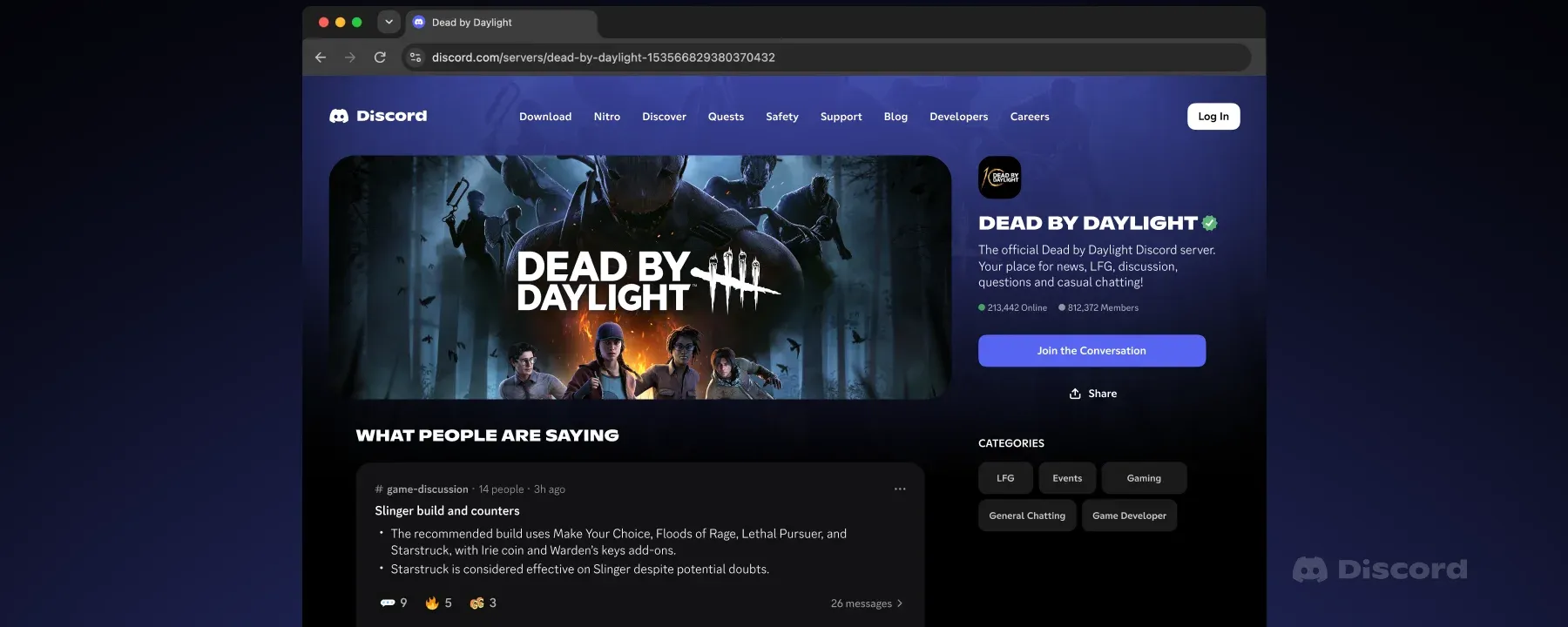
- Channel Summaries. Automated summaries of what people are talking about in public channels, shown on the server's public Server Web Page. Usernames aren't shown. These start November 16, 2026, and only cover conversations from that date on.
- Channel Messages. Actual messages, word for word, that can appear on the Server Web Page and in web search. Usernames and avatars are hidden. These start rolling out gradually from mid-December 2026.
Discord's pitch is that a lot of the knowledge that used to sit on forums, like boss guides, builds and crash fixes, now lives inside chat channels search engines can't see. It has already piloted Channel Messages with a few game communities, including NBA 2K, Rust and Dead by Daylight, though Discord says only admin and moderator posts were used in that pilot.
What becomes public and what doesn't
This is the part most people get wrong. Here's what the official pages say:
| Where you post | Can it appear on the web? |
|---|---|
| DMs and group DMs | No, never |
| Private servers (invite only) | No |
| Community Servers that aren't Discoverable | No |
| Role-restricted or private channels in a Discoverable Server | No, never included |
| Public channels in a Discoverable Server, messages sent before mid-December 2026 | No, regardless of your setting |
| Public channels in a Discoverable Server, messages sent from mid-December 2026 | Yes, if the admins left the channel on and your own setting is on |
A Discoverable Server is the most open type Discord has. It must have at least 1,000 members, be at least eight weeks old, meet activity and safety rules, and its admins must have listed it in Server Discovery so anyone can join without an invite. Discord says there are more than 63,000 of them. If you only hang out in your friends' server, none of this touches you.
One catch: Channel Summaries are generated separately from your personal setting. Your toggle covers your messages, but a summary of a channel's topic can still appear unless the admins turn summaries off.
The dates that matter
- October 27, 2026: controls for members and admins start rolling out.
- November 16, 2026: every Discoverable Server gets a Server Web Page (a default one is created if admins didn't make their own), and Channel Summaries can start.
- Mid-December 2026: Channel Messages begin rolling out gradually. Discord says it may take a few weeks before the first messages show up.
Is it on for you? Defaults by region
Your personal setting is off by default if your account is in the EU/EEA, UK, Canada, Brazil, Australia or South Korea. Discord cites legal restrictions there. Everywhere else, including the US and India, it's on by default. Teen accounts are excluded entirely and can't turn it on until they're adults.
So if you're reading this from India, the US or most of Asia and the Middle East, assume your messages are eligible until you check.
How to opt out as a member
Discord's help article says this setting can be changed on desktop or in a browser, and it then applies to your whole account, mobile included.
Step 1: Open Discord on desktop or the web
Use the desktop app or discord.com/app in a browser. Android Authority noted the toggle wasn't available directly in the Android app yet.
Step 2: Go to User Settings, then Data & Privacy
Click the gear icon next to your name at the bottom left, then pick Data & Privacy.
Step 3: Turn off the web pages toggle
Find Show my message content from Discoverable channels on web pages and switch it off. That single switch covers every Discoverable Server you're in. Discord notes the controls are rolling out gradually, so if you don't see it yet, check again in a few days.
Step 4: Watch for the channel label
Channels taking part get an icon in the channel header, and a pop-up appears before you post in one. It shows up again whenever a channel newly joins. That's your cue to think twice before posting something personal.
How server owners and admins turn it off
Only the server owner or members with the Administrator permission can change these settings, and only on desktop or in a browser. Bots can't change them.
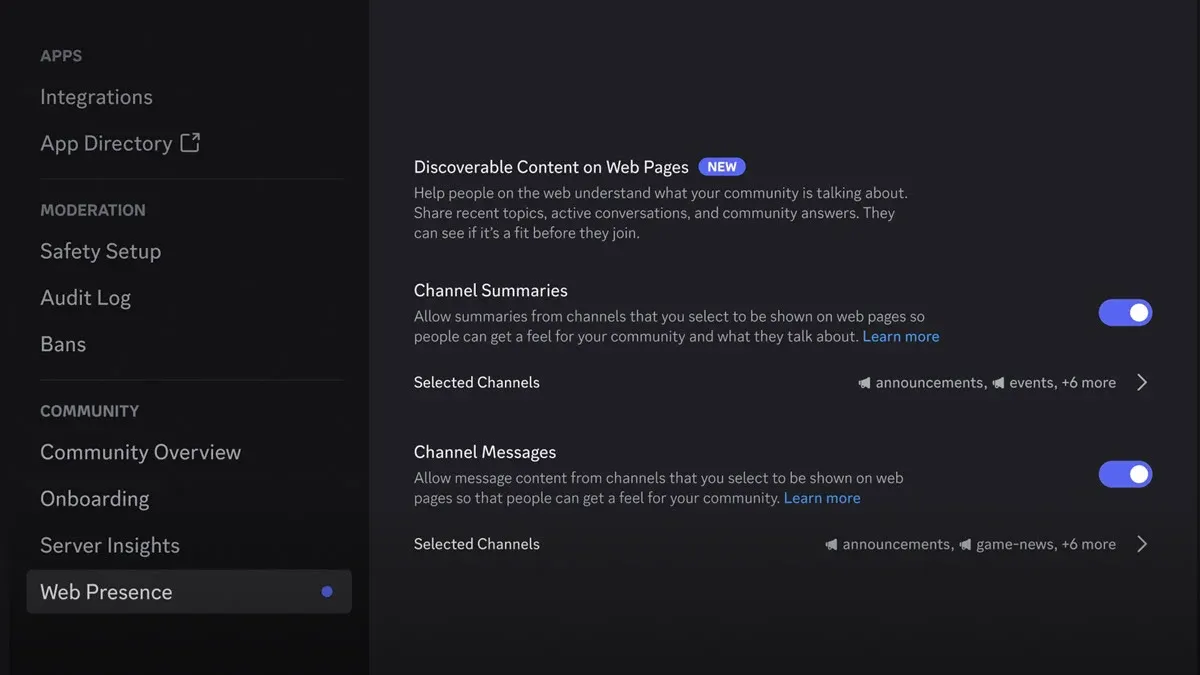
Step 5: Open Server Settings, then Web Presence
Open Server Settings and, under Community, select Web Presence. Discord says some admins will see a pop-up called "Reach new members on the web" that jumps straight there.
Step 6: Turn off Channel Messages, Channel Summaries, or both
Both toggles sit under Discoverable Content on Web Pages and are on by default. They're independent, so you can keep summaries but block messages, or the other way round.
Step 7: Or pick channels one by one
Each toggle has its own Selected Channels list. A sensible setup is to keep a help or FAQ channel on and switch off general chat, off-topic and anything where people talk about their lives.
Step 8: Leave Discovery if you don't want a web page at all
Discord says a Server Web Page is a core part of being Discoverable. There's no option to stay Discoverable without one. If that's a dealbreaker, switch back to a regular Community Server by turning off Server Discovery.
How to remove messages that already went public
This is the bit that catches people. Discord decides eligibility based on your setting at the moment you send a message. Turning the toggle off later does not pull back messages you sent while it was on. Discord's own words: it's "not a bulk remove my history action."
- Delete the message. Discord says deleting a message from Discord is how you stop it from appearing or remove it from its web pages. On desktop, hover over it, click the three dots and choose Delete Message. On mobile, long-press it.
- Ask Google to refresh the result. Search engines can keep a cached copy for a while after the original is gone. Google's Refresh Outdated Content tool lets anyone request an update for a page whose content has been removed.
- Old messages are safe. Anything you posted before mid-December 2026 isn't included at all, so there's no need to purge years of history.
Discord has no built-in bulk delete for your own messages, so if you're unsure, turning the toggle off now, before mid-December, saves you a lot of deleting later.
What people are asking on Reddit and X
The main complaint in the r/cybersecurity thread on this, as summarised by Pasquale Pillitteri, is that the option shouldn't be on by default. Another commenter pointed out that messages sent with it on stay searchable after you switch it off, which the help center confirms. The other recurring worries:
- "No username means it's anonymous, right?" Not really. A message that mentions your city, job or a unique story can still point back to you. Wccftech raised the same point.
- "Is this AI training?" According to that same write-up, Discord says it doesn't sell messages to AI companies and that nothing has changed there. It does use automated summaries, though, and once text is on the open web, anyone's crawler can read it.
- "Can my server opt out completely?" Admins can turn off both features for every channel. They just can't drop the Server Web Page itself without leaving Discovery.
If privacy switches like this are on your radar, Chrome's new autofill that reads your Gmail and Google using Gmail data for ads are two more worth checking this month.
Related guides: I keep the main security walkthrough in my guide to checking your PC after the NIKKE launcher malware. You might also want my notes on secrets leaking from Claude Code's settings.local.json or checking BTCPay Server after the hot-wallet attack. And if you're an AO3 user, here's what to do while AO3 is down.
FAQ
Will my Discord DMs show up on Google?
No. Discord says DMs, group DMs and private servers are always private and aren't part of this change.
Will my old Discord messages become public?
No. Messages sent before mid-December 2026 aren't included, whatever your setting is.
When do Discord messages start appearing in search?
Channel Summaries can start November 16, 2026. Individual messages roll out gradually from mid-December 2026.
Where is the Discord opt-out setting?
User Settings, then Data & Privacy, then turn off "Show my message content from Discoverable channels on web pages". Change it on desktop or the web; it applies to mobile too.
Does turning it off delete messages already shown?
No. It only affects messages sent after you switch it off. Delete individual messages to remove them.
Is my server affected?
Only if it's a Discoverable Server, meaning it's listed in Server Discovery and anyone can join without an invite.
Does it cost anything?
No. Both the member toggle and the admin controls are free for everyone, so there's nothing to pay in USD or INR.
Comments ()