Chrome Autofill Can Now Pull Details From Your Gmail
Chrome's Gemini-powered autofill now suggests order numbers and flight bookings from Gmail. Where it's live and how to control it.
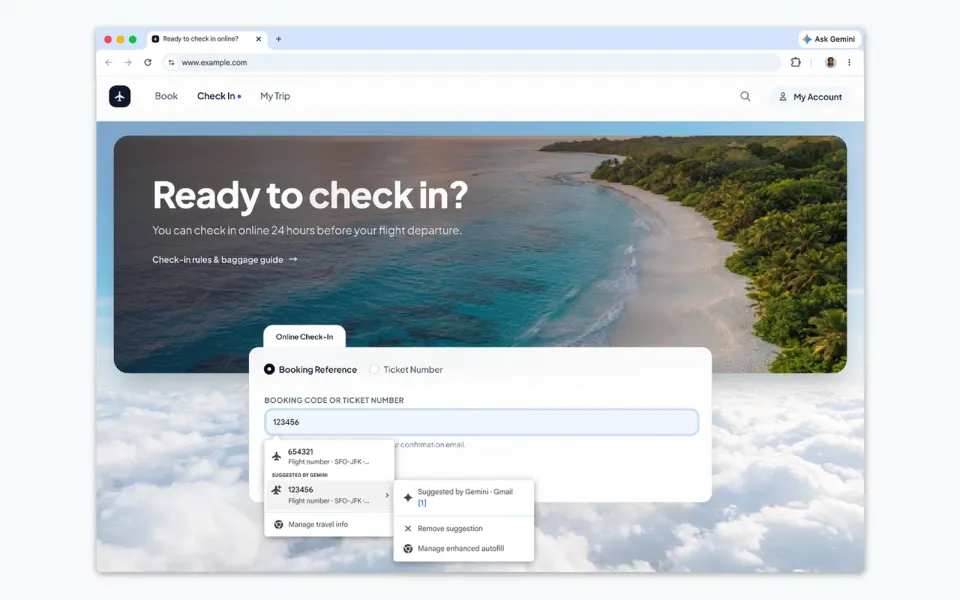
Chrome can now read your Gmail to fill in forms for you. Google switched it on in the US on October 28, and while it'll save time at airline check-in pages, I think you should look at the setting before it just starts happening.
What happened
Google's Chrome blog post says enhanced autofill, which runs on Gemini with Personal Intelligence, can now suggest details it finds in your inbox while you're filling out a web form. Google's examples are order numbers, tracking details and flight bookings. TechCrunch adds that it can also pull in things like membership IDs and confirmation numbers.
In Google's demo, you click into a booking code field on an airline site and Chrome offers a flight number marked "Suggested by Gemini · Gmail." There's a menu right there to remove the suggestion or manage the feature. Google also says Google Photos is next, so Chrome will soon be able to pull details from images in your library too.
The rollout covers desktop, Android and iOS, but only in the US and only for Gemini in Chrome users who've turned on Personal Intelligence.
Why it matters
Autofill used to mean your name, address and card number, things you typed in yourself. This is different. Chrome is now looking through your email to work out what a form wants, which is genuinely handy when you're hunting for a PNR at the airport. It's also another deep link between Google's browser and its AI, and a good reason Google would like you to stay in Chrome.
Google says sensitive data is encrypted and the feature is under your control. That's reassuring, but your inbox holds a lot more than flight details, so it's worth deciding for yourself whether you want this on.
What to do
- If you're in the US and use Gemini in Chrome, check Chrome's settings for enhanced autofill and choose what it's allowed to access. Google says both live there.
- Look at your Personal Intelligence settings too, since that's the switch that lets Gemini see your Google apps in the first place. While you're in there, it's worth checking whether your Gmail data is shaping Google ads, and how to opt out.
- On a shared or work computer, I'd leave it off.
- Outside the US, nothing changes yet. Google hasn't said when it'll expand.
Another privacy default worth checking this month: Discord messages appearing in Google search, and how to opt out.



Comments ()