Best Budget Gaming Mouse 2026: 5 Picks Under $50
Wired and wireless gaming mice under $50 from Logitech, HyperX, SteelSeries and Razer, with prices checked Nov 24 2026 and who each one suits.
As an Amazon Associate I earn from qualifying purchases.
Updated 24 November 2026. I checked every price on the brand's own US store on 24 November 2026, the week of Black Friday, so a couple of them will probably move again before the weekend. I haven't used all five of these mice for this piece. The picks come from official spec sheets, today's store prices and what long-term owners and reviewers keep saying about them.
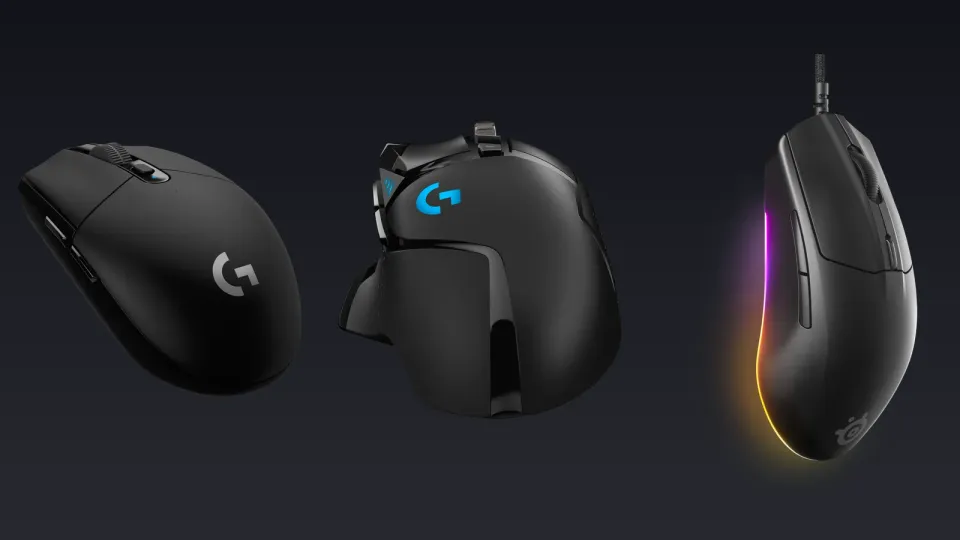
The best budget gaming mouse for most people right now is the Logitech G305 LIGHTSPEED. It's wireless, it runs for months on one AA battery, and Logitech has the black one at $27.51 today. If you want something lighter with Bluetooth as well, get the HyperX Pulsefire Haste 2 Core Wireless. If you'd rather never think about batteries, the wired SteelSeries Rival 3 Gen 2 is the one I'd pick.
The other two are for specific hands and habits. The Logitech G502 HERO suits MMO and productivity people who want 11 buttons and a heavy, planted feel. The Razer DeathAdder Essential is the cheapest way to get a proper right-handed ergonomic shape for a big hand.
Jump to:
- Quick comparison table
- How I picked
- Logitech G305 LIGHTSPEED
- HyperX Pulsefire Haste 2 Core Wireless
- SteelSeries Rival 3 Gen 2
- Logitech G502 HERO
- Razer DeathAdder Essential
- What actually matters in a cheap gaming mouse
- FAQ
Best budget gaming mice: quick comparison
Prices are what each brand's US store showed on 24 November 2026. Specs are from the official product pages.
| Mouse | Best for | Price (as of Nov 24, 2026) | Connection | Weight | Sensor (max DPI) | Buttons | Power |
|---|---|---|---|---|---|---|---|
| Logitech G305 LIGHTSPEED | Most people, wireless | $27.51 black on sale ($59.99 list), Logitech G | 2.4 GHz | 99 g | HERO, 12,000 | 6 | 1 AA, up to 250 h |
| HyperX Pulsefire Haste 2 Core Wireless | Light wireless + Bluetooth | $39.98 ($49.99 list), HyperX | 2.4 GHz + Bluetooth | 70 g | Custom Core, 12,000 | 6 | 1 AAA, up to 100 h |
| SteelSeries Rival 3 Gen 2 | Wired, shooters | $34.97, SteelSeries | USB cable | 77 g | TrueMove Core, 8,500 | 6 | Wired |
| Logitech G502 HERO | Lots of buttons | $29.99 on sale ($69.99 list), Logitech G | USB cable | 121 g (+ up to 18 g weights) | HERO, 25,600 | 11 | Wired |
| Razer DeathAdder Essential | Big hands, tight budget | $29.99, Razer | USB cable | 96 g | Optical, 6,400 | 5 | Wired |
How I picked these five
I started with the mice that keep coming up in "what should I buy under $50" threads on Reddit and in reviewer shortlists this year. Then I dropped anything that's hard to buy right now, or that only hits the price on a random third-party listing. The rules were simple:
- Under $50 on the brand's own US store today. Not a one-off marketplace price.
- A sensor that tracks cleanly. Every pick uses a modern optical sensor at 1,000 Hz polling. Past that, the DPI number on the box barely matters.
- A shape that isn't a gamble. These are proven shapes that have been on sale for years (or, for the Rival and the Haste, updates of proven ones).
- Brands that still support their software. G HUB, NGENUITY, SteelSeries GG and Synapse all store your DPI settings, and most of these mice keep them in onboard memory too.
What I didn't care about: RGB, 26,000 DPI marketing and "esports grade" stickers. I also left out unknown brands with great spec sheets, because at this price the switches and the support are where cheap mice tend to fail, and I can't check those from a product page.
Logitech G305 LIGHTSPEED: best budget wireless mouse
This mouse came out in 2018 and it still tops nearly every budget list, which tells you something. It uses Logitech's HERO sensor (200 to 12,000 DPI) over the same LIGHTSPEED 2.4 GHz wireless Logitech puts in its expensive mice, with a 1 ms report rate.
The battery is the part people love. Logitech rates it at up to 250 hours on one AA battery, and there's an Endurance mode in G HUB that stretches it further. The USB receiver tucks inside the mouse under the top shell, so it's easy to throw in a laptop bag.
Price: $27.51 for black and $26.99 for white on Logitech G's US store as of Nov 24, 2026, down from a $59.99 list price. The lilac, blue and mint colors were still at full price when I checked, so the color you pick changes the price a lot.
Who it's for: almost anyone with small to medium hands who wants to ditch the cable without spending much. It's also a great laptop mouse.
Skip it if: you have large hands and palm-grip, because it's a smallish mouse. It also has no Bluetooth, so it needs that USB receiver plugged in.
Logitech G305 (black) on Amazon · Logitech G store
HyperX Pulsefire Haste 2 Core Wireless: lightest pick
At 70 grams with its battery in, this is the lightest mouse here, and lighter mice are easier to flick around in fast shooters. HyperX gives it a symmetrical shape, a Custom Core sensor up to 12,000 DPI at 1,000 Hz, and TTC Gold switches rated for 20 million clicks.
The useful extra is Bluetooth. You can game on the 2.4 GHz dongle and then switch to Bluetooth for a work laptop or tablet. HyperX rates it at up to 100 hours on one AAA battery over 2.4 GHz, with longer life on Bluetooth at a lower polling rate.
Price: $39.98 on HyperX's US store as of Nov 24, 2026, down from $49.99.
Who it's for: FPS players who like a light, symmetrical mouse, and people who want one mouse for a gaming PC and a laptop.
Skip it if: you hate swapping batteries. 100 hours is fine, but it's well under the G305's 250, and you'll be buying AAAs.
HyperX Pulsefire Haste 2 Core Wireless on Amazon · HyperX store
SteelSeries Rival 3 Gen 2: best wired mouse under $50
If you sit at a desk and don't mind a cable, I'd take this over a cheap wireless mouse. The Gen 2 version is 77 grams, has a TrueMove Core sensor (8,500 DPI), 100% PTFE feet and a softer braided cable that drags less than the old rubbery ones.
SteelSeries says the switches are good for 60 million clicks, which is a lot more than the 10 to 20 million on the cheaper mice here. That matters, because a worn switch is how a lot of budget mice end up double-clicking after a year or two.
Price: $34.97 for the wired black model on SteelSeries' US store as of Nov 24, 2026.
Who it's for: claw and fingertip grip players, shooter fans and anyone who wants nothing to charge or replace.
Skip it if: you palm-grip with big hands. SteelSeries itself lists the grip style as claw or fingertip, and at 120.6 mm long it's a medium-small mouse.
SteelSeries Rival 3 Gen 2 on Amazon · SteelSeries store
Logitech G502 HERO: most buttons for the money
The G502 is the opposite of the light FPS trend. It's 121 grams, and you can add up to 18 grams more with five little 3.6 g weights that come in the box. You get 11 programmable buttons, a DPI-shift "sniper" button under your thumb, a scroll wheel that unlocks to spin freely, and the HERO 25K sensor (100 to 25,600 DPI).
All those buttons are handy outside games too. Honestly, a free-spinning wheel and spare thumb buttons do more for long spreadsheets and video timelines than any amount of DPI.
Price: $29.99 on Logitech G's US store as of Nov 24, 2026, down from $69.99. That's a huge cut for this mouse.
Who it's for: MMO and MOBA players who need lots of binds, people who like a heavy, planted mouse, and anyone who wants one mouse for games and work.
Skip it if: you play fast shooters with big arm movements, or you have small hands. It's heavy and wide.
Logitech G502 HERO on Amazon · Logitech G store
Razer DeathAdder Essential: cheapest ergonomic pick
The DeathAdder shape has been around for well over a decade, and the Essential is the cheapest way to get it. It's a right-handed ergonomic mouse that fills a bigger hand nicely, with a 6,400 DPI optical sensor, 5 programmable buttons and Razer mechanical switches rated for 10 million clicks. It weighs 96 grams.
The specs are the most basic on this list, and that's fine. 6,400 DPI is far more than anyone actually plays at. What you're paying for is the shape.
Price: $29.99 on Razer's US store as of Nov 24, 2026, in black or white.
Who it's for: palm-grip players with medium to large hands, and anyone buying a first gaming mouse for a kid or a second PC.
Skip it if: you're left-handed, or you can stretch to $35. The Rival 3 Gen 2 has a better sensor and much tougher switches for about five dollars more.
Razer DeathAdder Essential on Amazon · Razer store
What actually matters in a cheap gaming mouse
Here's the short version, since spec sheets on budget mice are mostly noise:
- Shape and size first. Measure your hand from wrist crease to fingertip. Roughly, under 17 cm, smaller mice like the G305 and Rival 3 Gen 2 fit better. Over 19 cm or so, look at the DeathAdder or the G502.
- Ignore max DPI. Most players sit somewhere between 400 and 1,600 DPI. Every sensor here handles that cleanly.
- Weight is taste, not skill. Light mice suit fast flicks, heavy ones suit slow, steady aim. Neither makes you better on its own.
- Wireless that's worth it uses a 2.4 GHz dongle. Bluetooth is fine for work but adds latency, so game on the dongle.
- Switch life matters more than you'd think. A worn switch is the most common reason a cheap mouse starts double-clicking. Higher rated click counts and a decent warranty are worth a few dollars.
One more thing on wireless: if the mouse stutters, move the receiver closer. Put it on a USB extension near the mouse pad, not behind the PC next to a USB 3 port or your Wi-Fi card.
Black Friday prices are moving daily this week. If one of these drops further or goes out of stock, tell me in the comments and I'll update the list.
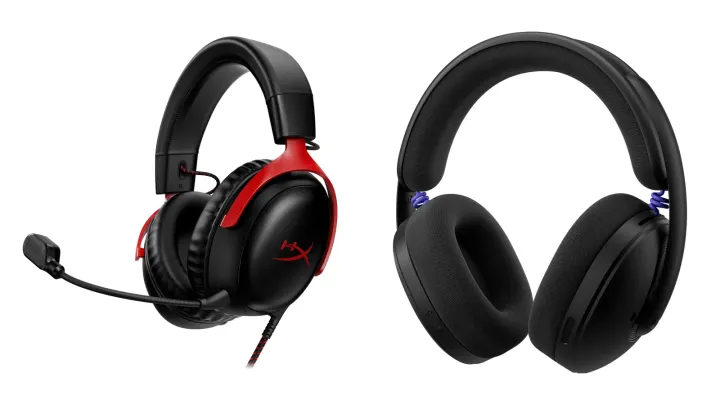
Related guides: if your aim feels off because the game itself is stuttering, start with my guide to fixing high ping and lag in online games. Need a headset to go with the mouse? See the best budget gaming headsets under $100. Building the whole setup from scratch? The budget PC build for 2026 has the rest. And if Windows doesn't see a new receiver, try the steps in USB device not recognized on Windows 11.
FAQ
What is the best gaming mouse under $50?
For most people, the Logitech G305 LIGHTSPEED. It's wireless, lasts up to 250 hours on one AA battery and was $27.51 in black on Logitech's US store as of Nov 24, 2026. If you want wired, the SteelSeries Rival 3 Gen 2 at $34.97 is the pick.
Is a wireless gaming mouse good for competitive games?
Yes, as long as it uses a 2.4 GHz receiver like Logitech LIGHTSPEED or HyperX's dongle. Those run at a 1,000 Hz polling rate, the same as the wired mice here. Avoid playing over Bluetooth, which is slower.
How much DPI do I need for gaming?
Much less than the box says. Most players use 400 to 1,600 DPI and fine-tune with in-game sensitivity. Any mouse with a 6,400 DPI or higher optical sensor has more than enough.
Is a lighter gaming mouse better?
Not automatically. Light mice like the 70 g Haste 2 Core Wireless are easier to flick in fast shooters, while heavier ones like the 121 g G502 HERO feel steadier for slower aim and everyday work. Pick the weight you find comfortable.
Why does my new gaming mouse double-click?
On a new mouse, check the double-click speed setting in Windows and any macros in the mouse software first. On an older mouse, a worn switch is the usual cause, which is why switch life ratings are worth checking.
Comments ()