APT CVE-2026-109518: Check and Patch Now
Max Justicz's APT bug (CVE-2026-109518) can turn a poisoned HTTP mirror into root RCE. Here's how to check your apt version and patch safely.
Updated 5 November 2026. Checked against Ubuntu's CVE-2026-109518 advisory and USN-8996-1, Canonical's blog post from 4 November, and Debian's security tracker (DSA-6607-1 / DLA-4880-1). I'll update this if Debian ships a forky fix or Ubuntu revises the notice.
Short answer: if you run Debian, Ubuntu, or a derivative and your apt package is older than the fixed builds below, an attacker who can mess with your HTTP traffic to a package mirror can trick APT into installing a fake .deb as root. CVSS 4.0 scores it 7.7 (High). The bug needs download retries to fire, and those retries are on by default from Debian 12 / Ubuntu 22.04 onward. Patch with retries temporarily set to zero, or flip your archives to HTTPS first.
I'm writing this because most of the machines I care about — VPS boxes, Raspberry Pis, home servers — still pull packages over plain HTTP mirrors. That is exactly the path this CVE hits. Here's the check-and-patch sequence I'd run.
Jump to:
- What happened
- Who is exposed
- Step 1: Check your apt version
- Step 2 (optional): Switch archives to HTTPS
- Step 3: Patch with retries off
- Step 4: Confirm the fix
- Step 5: Leave HTTPS on (or set Retries to 0)
- Fixed versions (table)
- FAQ
What happened
Max Justicz found and reported a flaw in APT's HTTP download path. When APT follows a redirect and then retries a package download, it can reuse a hard link in a way that lets a swapped-in file skip the usual archive signature check. The result: APT installs an attacker-controlled .deb, and the package scripts run as root.
Ubuntu assigned CVE-2026-109518 and shipped USN-8996-1 on 4 November 2026. Debian tracked the same bug and published DSA-6607-1 (trixie → apt 3.0.4) and DLA-4880-1 (bookworm → apt 2.6.2). Canonical's write-up is here: APT vulnerability fixes available.
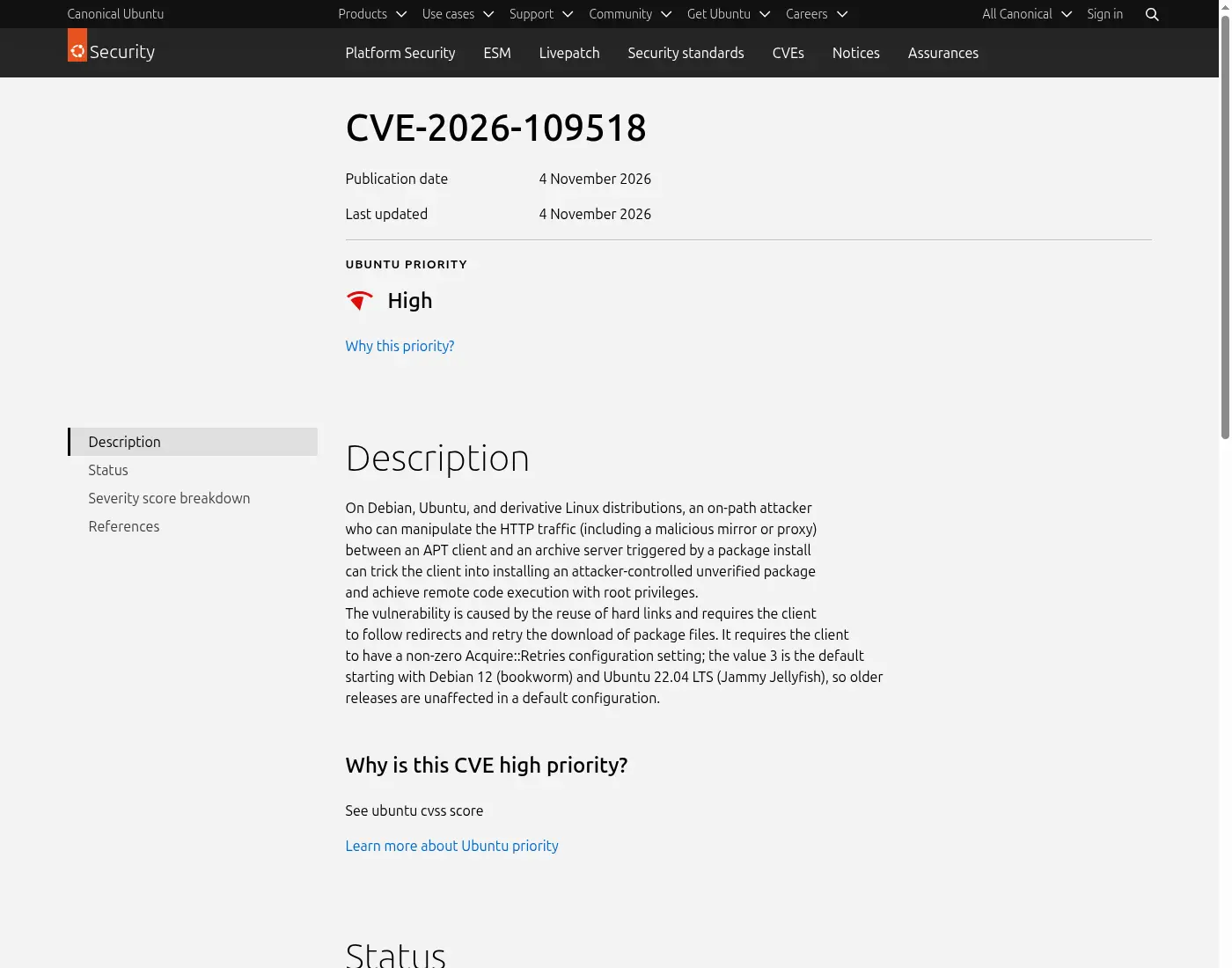
This is not a "drive-by from the public internet" bug. The attacker needs to sit on the path between your machine and the archive (malicious Wi-Fi, a poisoned proxy, or a bad mirror) and your client has to retry a download. Still: root RCE on a package manager is the kind of bug you patch the same day you hear about it.
Who is exposed
You're in the default-exposed group if:
- You run Ubuntu 22.04 LTS or newer, or Debian 12 (bookworm) or newer, and
- Your apt package is below the fixed version for your release, and
- You still fetch packages over HTTP (most default Ubuntu/Debian mirrors do).
Older Ubuntu releases (20.04 and below) only matter if someone set Acquire::Retries to a non-zero value. Snap installs are not affected — snaps use a different system. FTP and other non-HTTP transports are out of scope for this CVE. HTTPS archives close the on-path path, which is why Canonical recommends flipping to HTTPS before or while you patch.
If you also run home servers on the same hosts, the same apt patch covers the box that hosts Jellyfin, Pi-hole, or a Minecraft world — see my Jellyfin setup guide and the earlier Linux TCP CVE-2026-98432 check-and-patch post for related kernel hygiene.
Step 1: Check your apt version
On any Debian/Ubuntu box:
dpkg-query -W apt
# or, as Ubuntu suggests:
apt list --installed '?source-package(^apt$)'
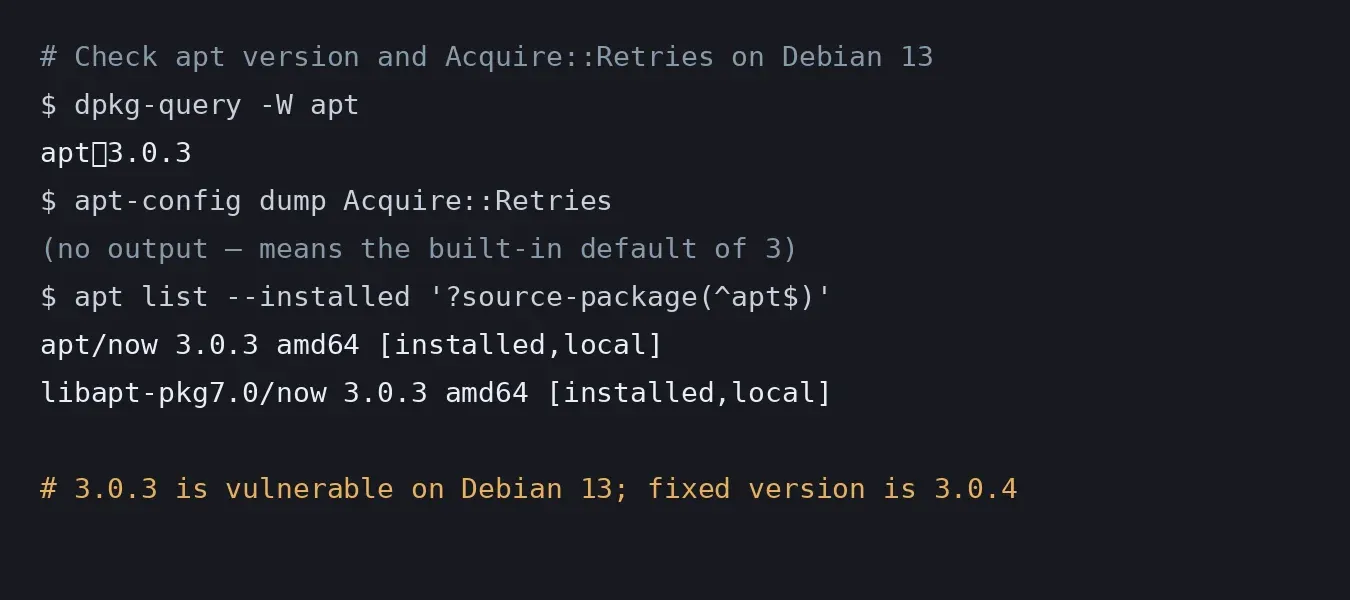
Compare what you get to the fixed versions in the table below. Anything older is vulnerable for that release.
While you're there, check whether retries are on:
apt-config dump Acquire::Retries
A value of 3 (or anything non-zero) means the exploit path is open. Zero means this specific CVE cannot fire even on an unpatched apt.
Step 2 (optional): Switch archives to HTTPS
If you cannot patch in the next few minutes and you talk to Ubuntu's own archives, flip HTTP → HTTPS first. Canonical's one-liner for the official hosts:
sudo sed -Ei 's!http://((([a-z]+\.)?archive|security|ports)\.ubuntu\.com)!https://\1!' \
  /etc/apt/sources.list /etc/apt/sources.list.d/*.list /etc/apt/sources.list.d/*.sources
sudo apt update
That command does not rewrite third-party or country mirrors. Some community mirrors still do not speak HTTPS — if apt update errors out, either pick a mirror that does or skip straight to Step 3 with retries off. Debian users: edit /etc/apt/sources.list (and anything under sources.list.d/) the same way, pointing at an HTTPS-capable Debian mirror.
Step 3: Patch with retries off
Canonical's recommended install for this update temporarily disables retries so the download itself cannot be abused mid-patch:
# Ubuntu / Debian — upgrade everything safely for this CVE
sudo apt update && sudo apt upgrade -o Acquire::Retries=0

# Or only refresh the apt source package:
sudo apt update && sudo apt install -o Acquire::Retries=0 --only-upgrade '?source-package(^apt$)'
On Debian, the same -o Acquire::Retries=0 flag works. After the command finishes you want:
- Debian 13 (trixie):
apt≥ 3.0.4 - Debian 12 (bookworm):
apt≥ 2.6.2 - Debian unstable (sid):
apt≥ 3.3.6 (forky was still on vulnerable 3.3.5 when I checked the tracker on 5 November) - Ubuntu 26.10:
3.3.3ubuntu0.1 - Ubuntu 26.04 LTS:
3.2.1ubuntu0.1 - Ubuntu 24.04 LTS:
2.8.4ubuntu0.1 - Ubuntu 22.04 LTS:
2.4.15ubuntu0.1 - Ubuntu 20.04 and older: fixed builds ship through Ubuntu Pro / ESM — see USN-8996-1
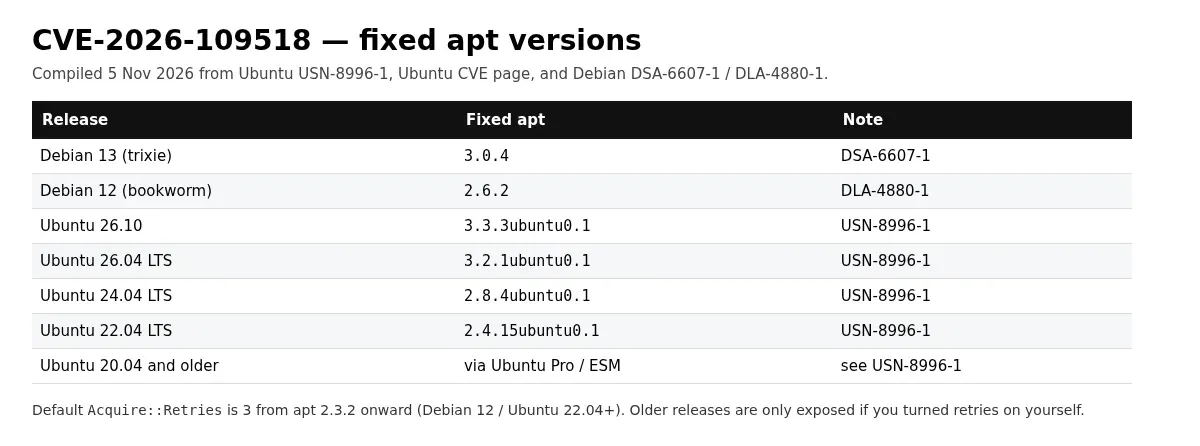
Unattended-upgrades on Ubuntu 16.04+ will usually pull this within 24 hours on its own. Do not wait on a machine that faces the public internet or sits on shared Wi-Fi — run the command above now.
Step 4: Confirm the fix
dpkg-query -W apt
apt-cache policy apt
The installed version should match or beat the fixed build for your release. If apt-cache policy still shows an older candidate, your mirror has not mirrored the security pocket yet — wait a bit, switch mirror, or point at security.ubuntu.com / security.debian.org over HTTPS and retry Step 3.
Step 5: Leave HTTPS on (or set Retries to 0)
Once you're patched, archive signatures are again the main integrity check. HTTPS is still worth keeping as defence in depth against the next transport bug. If a mirror you depend on cannot do TLS, you can leave retries off permanently:
echo 'Acquire::Retries "0";' | sudo tee /etc/apt/apt.conf.d/80retries
Trade-off: flaky mirrors will fail instead of retrying. For a laptop on hotel Wi-Fi I'd rather have retries off than leave this class of bug open; for a well-mirrored datacenter box, HTTPS + the patched apt is enough.
Fixed versions (table)
| Release | Fixed apt | Advisory |
|---|---|---|
| Debian 13 (trixie) | 3.0.4 | DSA-6607-1 |
| Debian 12 (bookworm) | 2.6.2 | DLA-4880-1 |
| Debian sid | 3.3.6 | Debian tracker |
| Ubuntu 26.10 | 3.3.3ubuntu0.1 | USN-8996-1 |
| Ubuntu 26.04 LTS | 3.2.1ubuntu0.1 | USN-8996-1 |
| Ubuntu 24.04 LTS | 2.8.4ubuntu0.1 | USN-8996-1 |
| Ubuntu 22.04 LTS | 2.4.15ubuntu0.1 | USN-8996-1 |
| Ubuntu 20.04 LTS and older | ESM / Ubuntu Pro builds | USN-8996-1 |
Sources: Ubuntu CVE page, USN-8996-1, Debian security tracker.
Related guides: I keep the main security walkthrough in my guide to checking your PC after the NIKKE launcher malware. You might also want my notes on checking BTCPay Server after the hot-wallet attack or Discord messages showing up in Google.
FAQ
Do I need to reinstall my OS?
No. Install the fixed apt package. Reinstalling does nothing extra for this CVE unless you already suspect the machine was compromised through some other path.
Does HTTPS alone fix it?
HTTPS blocks the on-path attacker this CVE needs, so it is a solid temporary shield. It does not replace the patched apt binary — a malicious mirror that serves HTTPS could still be in play for related tricks, and Canonical still wants you on the fixed build. Patch, then keep HTTPS.
Are Raspberry Pi OS, Linux Mint, Pop!_OS and other derivatives hit?
Yes if they ship Debian/Ubuntu's apt and have not yet pulled the fixed package. Check with dpkg-query -W apt and watch your distro's security tracker. Pi boards that only ever apt update over HTTP on public Wi-Fi are a common real-world case — same steps as above.
Does this affect snap, Flatpak or Docker pulls?
Snaps are explicitly out of scope per Canonical. Flatpak and container image pulls use different transports and signature schemes; this CVE is about APT's HTTP .deb path only.
Is anyone exploiting this in the wild?
As of the morning of 5 November 2026, neither Ubuntu nor Debian has reported confirmed mass exploitation. The attack needs on-path position or a bad mirror, which raises the bar — but the impact is root, so treat it as patch-now anyway.
I run unattended-upgrades. Am I done?
Probably within a day on Ubuntu 16.04+. Confirm with dpkg-query -W apt rather than assuming. Servers that pin packages or use a slow internal mirror may lag; run Step 3 by hand on anything important.


Comments ()