Instagram's Edits Video Editor Comes to Mac
Instagram Edits is now on Mac, free, with a multi-track timeline, 4K watermark-free export and AI agent support. No Windows yet.
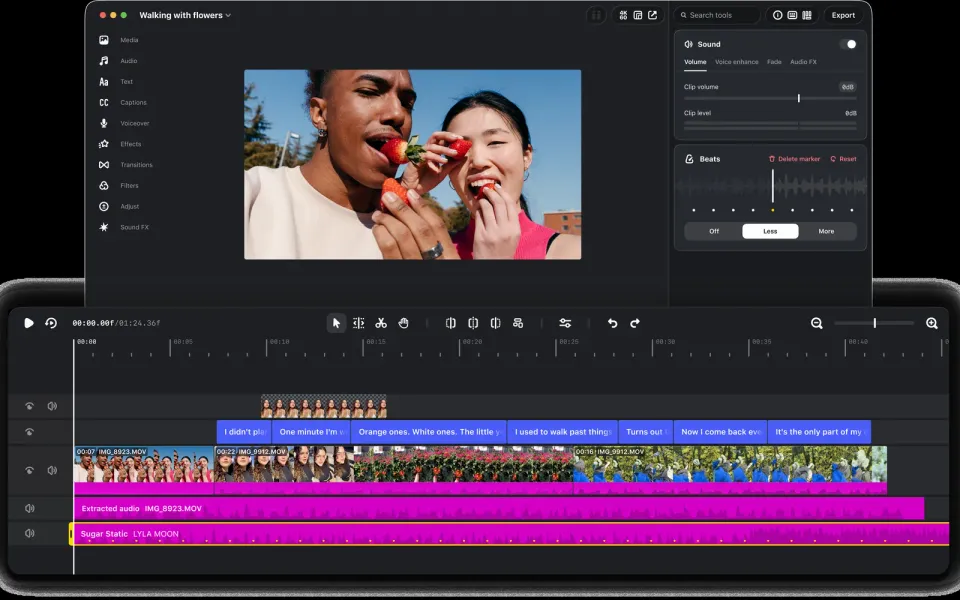
Instagram’s free video editor, Edits, is no longer stuck on your phone. Meta released a Mac version on November 5 with a proper multi-track timeline, color grading, 4K export without a watermark, and direct publishing to Instagram. There’s no Windows build yet, which matters a lot depending on where you edit.
What happened
Edits launched on mobile last year as Meta’s answer to CapCut, and Instagram says more than 50 million creators now use it. The desktop app, announced in a post from head of Edits Brett Westervelt and reported by TechCrunch, 9to5Mac, The Verge and MacRumors, is a free download from Instagram’s website.
Here’s what you get on the Mac:
- A multi-track timeline, keyframes, audio waveforms for beat-accurate cuts, and color wheels, curves and log conversion.
- Your own LUTs and font files, plus custom keyboard shortcuts you can import from another editor.
- Instagram’s licensed music library, sound and video effects, and unlimited auto captions in several languages.
- Horizontal and vertical formats, 4K export with no watermark, and direct posting to Instagram with tags, location and trial reels.
- An MCP server, so AI agents (Meta’s Muse or others) can make a rough cut you then finish by hand. Edits product lead Matthew Simari described this to The Verge.
Saved audio and text styles from the phone app sync across, but you can’t yet open the same project on both phone and Mac. Instagram says that’s in progress and that the desktop app will get weekly updates.
Why it matters
CapCut has had desktop apps on both Windows and Mac since 2021, and that’s where many serious short-form creators do their real work. Edits on Mac closes the most obvious gap. The 4K watermark-free export also makes it usable for YouTube and other platforms, not just Reels. Instagram has been pushing longer, widescreen video too (we covered its move to 90-minute uploads), and nobody wants to cut that on a 6-inch screen.
What to do
- On a Mac? Grab it from Instagram’s official Edits page, not a third-party mirror. Try it on a small project first, because it’s brand new and changes weekly.
- Moving from the phone app? Your saved text and audio styles should already be there. Finish an in-progress project on whichever device you started it on for now.
- On Windows? Keep using CapCut or another desktop editor. There’s no Windows date, so treat any “Edits for PC” download you come across as suspect.
- Need image work as well? Our guide to getting Affinity free on Windows, Mac and iPad covers a free design suite that sits well beside a video editor.
My take
Free, no watermark, 4K and a real timeline is a strong pitch, and I expect a lot of Mac-based creators to at least try it this week. The MCP piece is the most interesting bit to me. Letting an agent pull clips from your Downloads folder into a rough cut, then taking over manually, is the sort of AI editing that actually saves time instead of making slop.
The catch is the platform. Here in India especially, a huge share of creators cut Reels on a Windows laptop or straight on an Android phone, and a Mac-only launch skips them. Until Windows support and cross-device projects land, Edits desktop is a nice extra for Mac owners, not a reason to drop CapCut. It’s also worth remembering that Edits is built to keep you posting to Instagram. Export a clean copy of anything important so your work isn’t tied to one app.



Comments ()