Apple Will Scan Public iCloud Links in 27.3
iOS 27.3+: Anyone-with-the-link iCloud shares lose E2EE and get checked for harmful content.
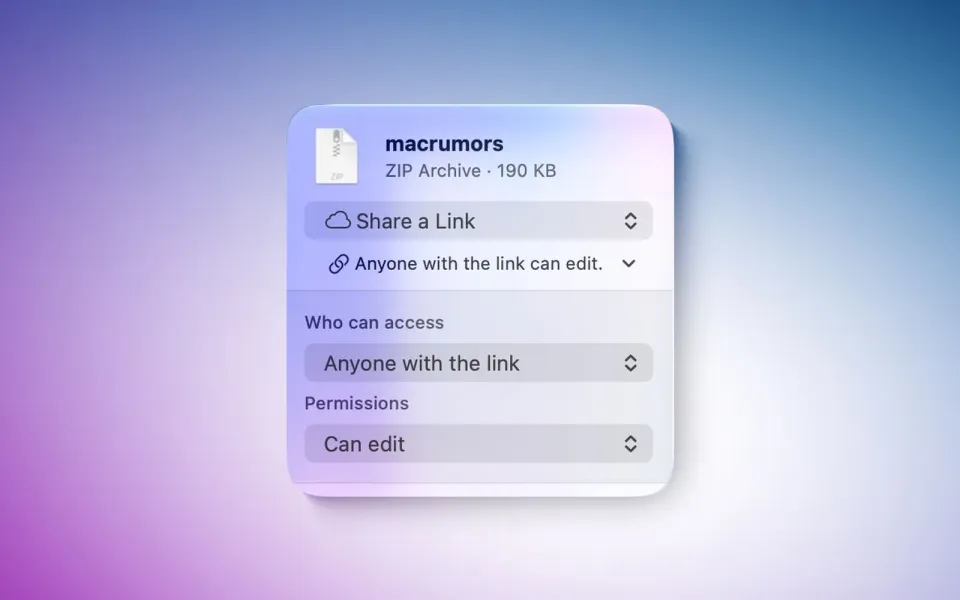
Starting with the 27.3 updates, Apple will check iCloud Photos and Drive items you share with "Anyone with the link" for harmful content. Public links also drop end-to-end encryption — even if Advanced Data Protection is on.
What happened
Apple published support document HT149168 (dated November 3, 2026). In iOS, iPadOS, macOS, and visionOS 27.3 or later, when you share an iCloud Photos image or iCloud Drive file with Anyone with the link, that content is "made accessible to Apple to check for harmful content." MacRumors, The Verge, and 9to5Mac spotted the change as the first 27.3 developer betas landed.
Two share modes stay in place. People you choose is invitation-only. Anyone with the link is the open URL — and that is the one Apple will check. "Send a Copy" (a direct file send) is separate from link sharing. Apple does not define "harmful content" in the doc. It does say it may move, refuse, modify, remove, or delete flagged uploads, and may block or disable an Apple Account, block new accounts on the same email or phone number, or involve law enforcement if necessary.
Apple also states that items shared with Anyone with the Link are no longer end-to-end encrypted, even when Advanced Data Protection is enabled, because the open link has to be readable by anyone who has it — including Apple. The company has not said whether links created before 27.3 get scanned after you update. 27.3 is in developer beta now; a public release is expected in December.
Why it matters
This is not on-device scanning of your private photo library. It is a clear line: if you turn an iCloud item into a public file host, Apple can inspect it. That is closer to how every other public link service works, and it follows years of pressure over CSAM on cloud hosts. The open question is false positives — account locks over bad detections have bitten users on other platforms — and Apple's doc leaves "harmful" undefined.
If you only share with people you invite, nothing in HT149168 changes your flow. If you paste iCloud links into Discord, Slack, or a public post, assume those files are visible to Apple under 27.3 and plan backups that do not depend on a single Apple Account staying unlocked.
What to do
- Prefer People you choose (or Send a Copy) for anything sensitive. Skip Anyone with the link unless the file is already meant to be public.
- After 27.3 ships, re-check old public iCloud links you still care about. Apple has not promised grandfathering.
- Keep a non-iCloud backup of important files. Account actions in the support doc include full locks.
- If you're already deep in iCloud workflows, our notes on ChatGPT's iCloud Mail/Calendar plugins and freeing iPhone storage without nuking photos are still the practical companions — this change is about public links, not private library management.



Comments ()