Microsoft 365 Family Moves to 2TB Shared Storage
Microsoft 365 Family and Premium are switching from 1TB per person to 2TB shared by the whole household. Here is when it hits you and what to do.
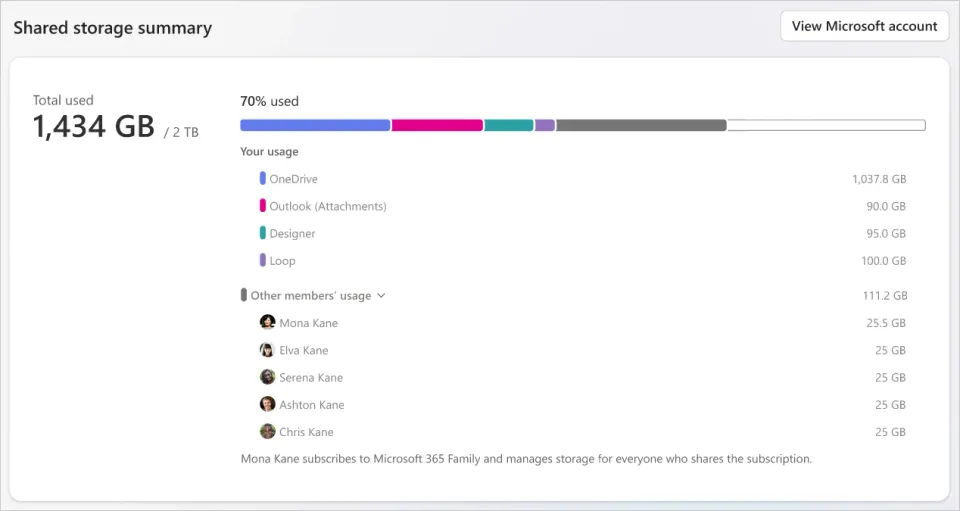
If you share a Microsoft 365 Family plan with your household, your OneDrive space is about to shrink, and probably by a lot. Microsoft is moving the plan from separate storage for each person to one shared pool, and that pool is much smaller than what families get today.
What happened
Microsoft has rolled out what it calls shared storage for its Family, Premium and Pro plans. Until October 8, a Family plan gave each of up to six people their own 1TB, so a full household had up to 6TB in total. New and upgraded Family and Premium subscriptions now come with 2TB shared across everyone. Pro gets 5TB shared. Engadget spotted the change and posted about it on X.
The price stays the same. Microsoft 365 Family is still $129.99 a year (or $12.99 a month) in the US and ₹8,199 a year in India, based on Microsoft's own pricing pages.
If you already pay for Family or Premium, nothing changes right away. Your plan moves to shared storage at your first renewal on or after May 2, 2027. There's a catch, though: if you upgrade from Family to Premium before then, the shared model can kick in straight away.
Why it matters
Microsoft frames this as more flexible, and to be fair it is for some people. If you're the only one using your Family plan, you get the full 2TB to yourself instead of being capped at 1TB. But for a busy household where several people back up phone photos to OneDrive, going from up to 6TB to 2TB is a real cut, and you're paying the same for it.
Files stay private either way. Other members can't see what you store, only the total each person is using. And if your group goes over 2TB, you don't lose anything right away: Microsoft says you can keep accessing your files for up to a year while you sort it out.
What to do
- Ask everyone on your plan how much they're using. Add it up. If you're comfortably under 2TB, you can relax.
- If you're over, start cleaning up early. Old phone backups and duplicate photos are usually the biggest culprits. My guide to freeing up iPhone storage has a few tricks that apply here too.
- Think twice before upgrading to Premium before May 2027 if storage matters to you, since that can switch you to the shared model early.
- If you need more space, Microsoft sells add-on storage that takes a plan up to 10TB in total. Or compare it with Google One or iCloud+ family plans before your renewal comes around.



Comments ()