Apple Music 7.0 for Android Gets Liquid Glass Look
Apple Music 7.0 on Android brings a floating tab bar, a new black or white icon and a blue accent. Here is what changed and how to update.
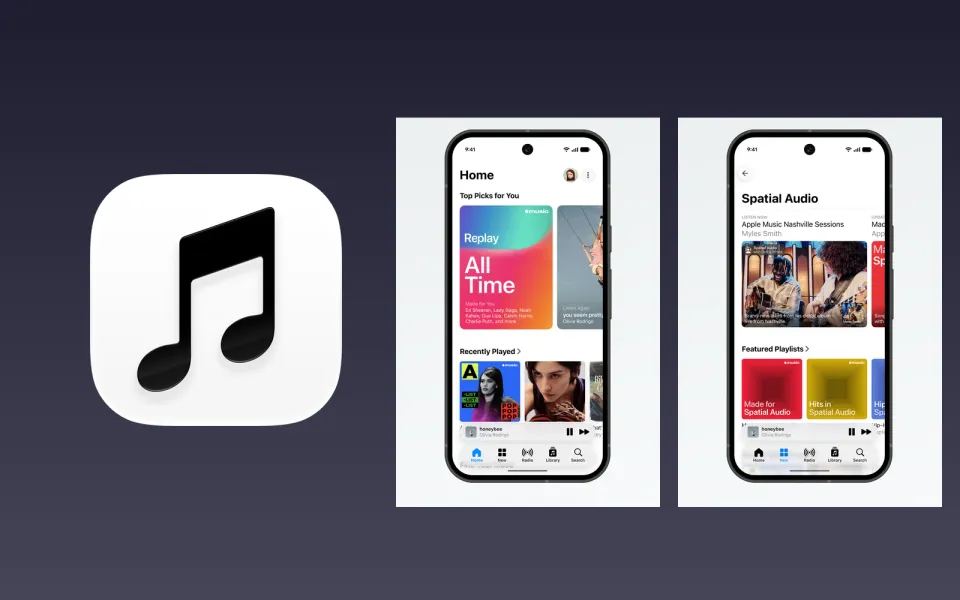
Apple Music on Android finally looks like the iPhone version again. Version 7.0 is rolling out through the Play Store now, and it brings the Liquid Glass style Apple introduced with iOS 27 over to Android phones.
What happened
9to5Google spotted the update on October 30 and shared it on X. Apple recently switched its Android app to the same version numbers as iOS, so 7.0 lines up with iOS 27.
The biggest change is at the bottom of the screen. The tab bar now floats above your content instead of being stuck to the edge, with a little see-through effect so you can make out colours behind it. The mini player floats too, and it's no longer attached to the tab bar. One difference from iPhone: scrolling down doesn't shrink the bar here.
A few other bits changed as well:
- The app icon is now a plain music note in black or white, depending on your phone's theme, instead of the red background.
- Apple Music's accent colour is now blue, not red.
- The app runs edge to edge, under Android's status bar and navigation bar.
- Artist pages are redesigned, with a background that picks up colours from the artwork and a big play button.
- Pins and category editing in the Library tab moved into the three-dot menu, and Settings are grouped better.
The Now Playing screen is mostly the same, which makes sense since it didn't change much on iOS either.
Why it matters
For years Apple Music on Android felt like an afterthought, always a step behind the iPhone app. Getting the same design on the same version number is a sign Apple is taking Android listeners more seriously, and that matters for anyone who uses both platforms or plans to switch.
I'm not fully sold on the blue accent, honestly. Red has been Apple Music's colour forever, and the new icon is easy to miss on a busy home screen. But the floating bar does make the app feel lighter and more modern on a big phone.
What to do
- Open the Play Store, search for Apple Music and tap Update. If you don't see 7.0 yet, check again in a day or two, since rollouts are staggered.
- Look for the new black or white icon. If you can't find the app on your home screen, that's probably why.
- Your library, playlists and downloads carry over, so there's nothing to set up again.
Moving from an iPhone to Android? My guide on moving your eSIM from iPhone to Android covers the step most people get stuck on.




Comments ()